Skip to content
View in the app

A better way to browse. Learn more.

BariatricPal

A full-screen app on your home screen with push notifications, badges and more.

To install this app on iOS and iPadOS
  1. Tap the Share icon in Safari
  2. Scroll the menu and tap Add to Home Screen.
  3. Tap Add in the top-right corner.
To install this app on Android
  1. Tap the 3-dot menu (⋮) in the top-right corner of the browser.
  2. Tap Add to Home screen or Install app.
  3. Confirm by tapping Install.

Onederland

  • Popular Post

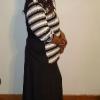
Started my journey 3 yrs ago.

Surgery 4/25/12

Sw:325lbslbs

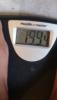
CW:199.4lbs

GW:150lbs

Haven't been under 200lbs in over 8yrs

  • Replies 8
  • Views 784
  • Created
  • Last Reply

Featured Replies

Congratulations! What an amazing accomplishment! You have every right to be so proud of how far you've come. You are a shining example to us all!

YIPPEE!!!! This is so great.....way to go!

@@Anume 937

Well super congrats to you!

You've been with us for a long time now and I've seen your dedication and successes.

I wish you continued happiness and health! :)

Congratulations!! What an amazing accomplishment!!!

Congratulations, seriously great accomplishment

Congrats. Getting to onederland is such a great accomplishment.

Archived

This topic is now archived and is closed to further replies.

Trending Products

PatchAid Vitamin Patches

Account

Navigation

Search

Search

Configure browser push notifications

Chrome (Android)
  1. Tap the lock icon next to the address bar.
  2. Tap Permissions → Notifications.
  3. Adjust your preference.
Chrome (Desktop)
  1. Click the padlock icon in the address bar.
  2. Select Site settings.
  3. Find Notifications and adjust your preference.