Skip to content
View in the app

A better way to browse. Learn more.

BariatricPal

A full-screen app on your home screen with push notifications, badges and more.

To install this app on iOS and iPadOS
  1. Tap the Share icon in Safari
  2. Scroll the menu and tap Add to Home Screen.
  3. Tap Add in the top-right corner.
To install this app on Android
  1. Tap the 3-dot menu (⋮) in the top-right corner of the browser.
  2. Tap Add to Home screen or Install app.
  3. Confirm by tapping Install.

Looking for a picture

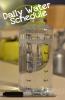
Hello all, earlier in October or early November someone posted a picture of a Water bottle marked out with a sharpie with the times of day on it and how much you would drink at that time to help with hydration . Does anyone have a copy of it. I have looked around and cant seem to find it. Any help would be appreciated.

  • Replies 4
  • Views 542
  • Created
  • Last Reply

Featured Replies

That's a really awesome guide to make sure you a drinking enough fluids through out the day with out over doing it

Wow, what a great idea. This group is amazing with ideas and support. I have learned so much , makes my weight loss journey so much easier. THANK you

This is one I picked up a few weeks ago from somewhere on this site. I knew I would need it again!

post-194532-0-90254500-1417304160_thumb.jpg

Archived

This topic is now archived and is closed to further replies.

Trending Products

PatchAid Vitamin Patches

Account

Navigation

Search

Search

Configure browser push notifications

Chrome (Android)
  1. Tap the lock icon next to the address bar.
  2. Tap Permissions → Notifications.
  3. Adjust your preference.
Chrome (Desktop)
  1. Click the padlock icon in the address bar.
  2. Select Site settings.
  3. Find Notifications and adjust your preference.