MrsMurky721
Gastric Sleeve Patients
-
Joined
-
Last visited
-
-
-
-
-
-
-
-
-
-
-
-
-
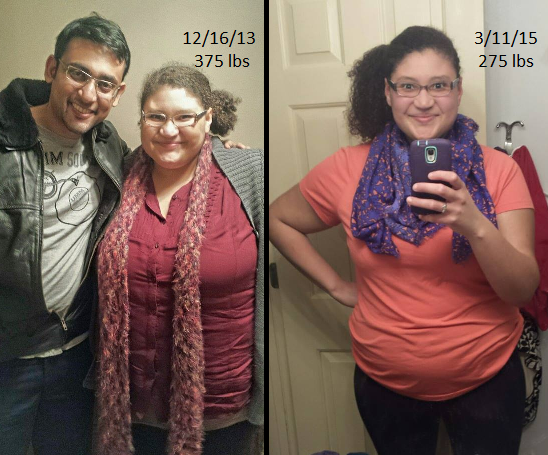
I'm so excited to finally get to post on this thread!!! My surgery was on December 11th. I've lost 62 lbs since surgery but 100 lbs overall!! I still have 115 lbs to go but I'm halfway there now!

-
Re-fried Beans with queso from my favorite mexican restaurant lasted me days and went down well! I also ate a lot of salmon. I've never liked fish but I needed the Protein so I searched and searched and found a recipe I liked. Also tuna salad! I'm glad you're finally getting into the groove of things after a complication like that!
-
I was sleeved on December 11th. I've lost 62 lbs since surgery and 100 lbs total! Woot!
-
-
I was sleeved December 11th. Since surgery I've lost 44 lbs and I'm down 82 lbs total! I'm feeling like my normal self again! I haven't really hit a stall but the weight is coming off slower now since I'm eating real food. I started exercising about two weeks ago and it has really helped kick start my weight loss again! I'm still having problems with vomiting random things. I think it's because I either eat too fast or one bite too much. I'm able to get all my Protein and Water in, but I keep forgetting to take my Vitamins
-
-
People's pain after surgery differs, really. There's no way to tell how your pain will be so you may as well be prepared or the worst. I've seen stories of people not needing pain meds after leaving the hospital. I needed the pain meds constantly for almost 6 days. When you wake up you may be in pain or you may not. If you are the docs will give you some good stuff to take care of that. Make sure you stay on top of your pain- don't wait to ask for pain meds when you're in dire need of them. I researched obsessively for months before my surgery. The way I went into surgery was this - I knew it would be a shitty first week. I knew I would be in pain. I knew I wouldn't be able to eat and it would suck to do pretty much anything but sleep. I knew work would suck. But I also knew that I was making the decision to have surgery for a damn good reason and the first two weeks are definitely worth a lifetime of health and happiness. Good luck!
-
I got sleeved December 11th. I've lost 28lbs postop and 67 total. Still having trouble getting all my Protein in but have no problem with Water. Just now beginning to eat, really. Usually one meal a day. About 2 oz of fish and then I try to get in two protein shakes. I can already tell a huge difference in my appearance! Went back to work two weeks ago and still struggling with tiredness and being lightheaded. I'm still trying to wrap my had around this new lifestyle where eating is hard lol but it's what I signed up for. Overall things are good.
-
-
-
-
Even with the relaxing meds in pre-op that they gave me (which we amazing btw) I still started crying when they wheeled me away. Then I got to the operating room and had a full blown panic attack. It was really scary for me, I can't deny that. But this all happened in a span of like 4 minutes tops, if that. As soon as they saw that I was really freaking out they went ahead and gave me the anesthesia.
-
I didn't like the chocolate but the vanilla is delicious!! It tastes like melted ice cream! Omnomnomnom!
-
-
-
-
I needed help getting to the restroom for the first day or so but no help in the bathroom before or after. Try to get your pain meds in and working before heading to the potty and/or going for a walk so you can do more on your own.
-
I was sleeved on Decemeber 11th. I felt those hunger pains too!!! I'm so happy I'm not the only one! I swear it felt like genuine hunger! I was so aggravated! Aren't we supposed to not feel hunger? But a few days ago I realized that the hunger wasn't there anymore. That's also around the same time I was able to start getting more Protein and Water in so I don't know what it was but it's gone now. YAY!! Maybe everybody feels it the first few weeks or something? I have no idea! I'm still dealing with cravings for certain things but doing well overall and resisting. I'll tell you though, ice cold water has never tasted so refreshing in my entire life! I don't know what it is, but water tickles my pickle now! We can do this! WOOT!
-
Wow! The difference is clear already! Great job!!
-
Most of the things I wish I knew had nothing to do with the actual removal of my stomach like: - How hard it would be to eat slower - That my nose would be dry and bleed from all the oxygen. - How painful it would be to breath deeply/cough the first few days after surgery. Using that incentive spirometer hurts!!! But it does help! -That I would be allergic to the antibiotic they gave me in the hospital! AHH! Breaking out in terrible itchy rashy hivey things all over my body in the middle of the night is not fun! Especially when it takes the nurses thirty minutes to get to my room! What the hell!! - That my IV would go bad and two and a half weeks post-op my vein has still not recovered Of course, these are all very minor when you think about the worst that could have happened! I was mostly unprepared for being in the hospital because I've never stayed in the hospital before. I would still do it all over again. I'm 19 days post-op and I've lost 25 pound since surgery and 60 pounds overall! Don't stress! You'll do great!
-
Each day should be better than the previous. If you have sudden extreme pain in your belly area I suggest you call up your surgeon's office to let them know. It could be nothing or it could be something! There's nothing to lose by calling
-
You are incredible. It had to have taken so much strength and courage to do what you did. Thank you for taking that extra step to help others live more healthy after you were done with turning your life around. You are inspiring others. You're inspiring me!
-
Just like SuperDave, I've been using a baby spoon to train myself on the size of bites I should take. It's been working out well. I was having problems with things coming back up but then I realized it had nothing to do with the food I was eating but that I was eating too fast! I slowed it down and everything is fine now! Except that I still want to eat fast! I have a problem with self control LOL!