Skip to content
View in the app

A better way to browse. Learn more.

BariatricPal

A full-screen app on your home screen with push notifications, badges and more.

To install this app on iOS and iPadOS
  1. Tap the Share icon in Safari
  2. Scroll the menu and tap Add to Home Screen.
  3. Tap Add in the top-right corner.
To install this app on Android
  1. Tap the 3-dot menu (⋮) in the top-right corner of the browser.
  2. Tap Add to Home screen or Install app.
  3. Confirm by tapping Install.

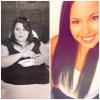
10 months post op.

  • Replies 13
  • Views 1.5k
  • Created
  • Last Reply

Featured Replies

Awesome job. What a beautiful smile

10 months. 91 pounds. Best decision I ever made.

You look beautiful

Great job ! Be proud - you look wonderful - Pretty girl:)

Wow ! I cant believe the difference ! Great job ! Care to share how you did it ?

  • Author

I did it by following rules from my surgeon. I exercise for at least an hour a day. At least 6 days a week. I drink water... Religiously. And I don't drink when I eat.

Congratulations! You must feel amazing!

Congratulations! So happy for you -- here's to health and happiness!

Lovely and smart! :-)

Congratulations on finding your way!

You and I were probably banded around the same time..... Life changing, huh? Best wishes for continued success!

Congratulations!!!!

Wow girl great job you look gorgeous!

Archived

This topic is now archived and is closed to further replies.

Trending Products

PatchAid Vitamin Patches

Account

Navigation

Search

Search

Configure browser push notifications

Chrome (Android)
  1. Tap the lock icon next to the address bar.
  2. Tap Permissions → Notifications.
  3. Adjust your preference.
Chrome (Desktop)
  1. Click the padlock icon in the address bar.
  2. Select Site settings.
  3. Find Notifications and adjust your preference.