Skip to content
View in the app

A better way to browse. Learn more.

BariatricPal

A full-screen app on your home screen with push notifications, badges and more.

To install this app on iOS and iPadOS
  1. Tap the Share icon in Safari
  2. Scroll the menu and tap Add to Home Screen.
  3. Tap Add in the top-right corner.
To install this app on Android
  1. Tap the 3-dot menu (⋮) in the top-right corner of the browser.
  2. Tap Add to Home screen or Install app.
  3. Confirm by tapping Install.

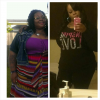
5mths 100lbs gone!

  • Replies 10
  • Views 1.3k
  • Created
  • Last Reply

Featured Replies

You look good!.....in both pics but we know how we luv skinnier in here! Nice work. Do u exercise daily & if so, what kind?...gym,walking?

Wow! and look at those curves! Way to go!

Awesome!! Congratulations!

Congratulations on your weight loss!!!

What are your stats?

You go girl!!!!! You look great!!! Keep up the good work and through him all things are possible

Amazing job!

  • Author

You look good!.....in both pics but we know how we luv skinnier in here! Nice work. Do u exercise daily & if so, what kind?...gym,walking?

I have been slacking the past 2weeks, but I workout at home. I do the walking dvd, 3miles 3x a week( leslie sansom) , and after the dvd I do 20mins of 5lb weights, squats and leg lifts. If I'm up to it that evening I would run on my treadmill for about 15mins. But that's maybe twice a week. Oh and I also do waist training using the vest, but I haven't for the past month because the vest is loose and I haven't ordered a smaller size yet.

Edited by Roxiaa

  • Author

Congratulations on your weight loss!!!

What are your stats?

HW 394 SW 373 CW 283 so really 111lbs but I counted from pre-op in which I was 383 sleeved 9/25/13 I'm 5'7

Edited by Roxiaa

Archived

This topic is now archived and is closed to further replies.

Trending Products

PatchAid Vitamin Patches

Account

Navigation

Search

Search

Configure browser push notifications

Chrome (Android)
  1. Tap the lock icon next to the address bar.
  2. Tap Permissions → Notifications.
  3. Adjust your preference.
Chrome (Desktop)
  1. Click the padlock icon in the address bar.
  2. Select Site settings.
  3. Find Notifications and adjust your preference.