Skip to content
View in the app

A better way to browse. Learn more.

BariatricPal

A full-screen app on your home screen with push notifications, badges and more.

To install this app on iOS and iPadOS
  1. Tap the Share icon in Safari
  2. Scroll the menu and tap Add to Home Screen.
  3. Tap Add in the top-right corner.
To install this app on Android
  1. Tap the 3-dot menu (⋮) in the top-right corner of the browser.
  2. Tap Add to Home screen or Install app.
  3. Confirm by tapping Install.

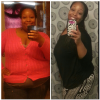
115lbs gone!

[ATTACH]20451[/ATTACH]

post-43924-13838396969412_thumb.png

  • Replies 17
  • Views 2.3k
  • Created
  • Last Reply

Featured Replies

Holy smokes! Looking amazing! Keep on doing whatever you're doing girlfriend!

Wow you look incredible!!! You are your former selfs younger (little) sister! Lol. When was your surgery? How was your recovery? I'm getting sleeved in December so Id love to here about your journey. What's a sample day with your diet like? Congrats on your success!!!! You are an inspiration!!

Awesome! Keep up the great work :)

congrats on great success :) :)

Incredible, keep it up!

  • Author
Wow you look incredible!!! You are your former selfs younger (little) sister! Lol. When was your surgery? How was your recovery? I'm getting sleeved in December so Id love to here about your journey. What's a sample day with your diet like? Congrats on your success!!!! You are an inspiration!!

Thank you I was sleeved April 2nd this yr...the day after I hurt but I walked as much as i could and it got better...I eat pretty much whatever I like in very small amounts I don't to to much meat or fried foods and really sweet foods make me super sick I can have some but not to much...

Wonderful!!!

You are looking fabulous!! Great job!! :)

Amazing!!! Beautiful smile!

Lookin' gooood! Keep it up, and congrats.

You look awesome! Can't wait til I have my surgery. Sometime next year, insurance requires 6 mnths diet..feels like it's never going to happen :-(

  • Author
Holy smokes! Looking amazing! Keep on doing whatever you're doing girlfriend!

Thank you I'm trying my best

Archived

This topic is now archived and is closed to further replies.

Trending Products

PatchAid Vitamin Patches

Account

Navigation

Search

Search

Configure browser push notifications

Chrome (Android)
  1. Tap the lock icon next to the address bar.
  2. Tap Permissions → Notifications.
  3. Adjust your preference.
Chrome (Desktop)
  1. Click the padlock icon in the address bar.
  2. Select Site settings.
  3. Find Notifications and adjust your preference.