Skip to content
View in the app

A better way to browse. Learn more.

BariatricPal

A full-screen app on your home screen with push notifications, badges and more.

To install this app on iOS and iPadOS
  1. Tap the Share icon in Safari
  2. Scroll the menu and tap Add to Home Screen.
  3. Tap Add in the top-right corner.
To install this app on Android
  1. Tap the 3-dot menu (⋮) in the top-right corner of the browser.
  2. Tap Add to Home screen or Install app.
  3. Confirm by tapping Install.

100 Lbs Gone!

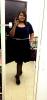
Started my journey at 342 lbs on 21st may.. Honestly it's been an easy journey compared to the others.. I don't dump, have been cleared to eat anything and no Proteins.. I thought I wouldn't make it but today 4 months and 20 days later I am at 242!! I feel so grateful for this second chance at life

post-17246-13813810534048_thumb.jpg

  • Replies 28
  • Views 1.7k
  • Created
  • Last Reply

Featured Replies

  • Author

Thank you all !! I appreciate your good wishes

WOW! Awesome job!!! Looking mighty fine!!!! Bet your beating fellas off with a stick!!

  • Author
WOW! Awesome job!!! Looking mighty fine!!!! Bet your beating fellas off with a stick!!

Haha! I wish, I'm still too fat for where I live... Thanks!

You are just amazing and inspiring! I am 2.5 weeks out and down 60 pounds (40 bsurgery/20 asurgery). You make me see the light at the end of the tunnel...

Congrats and looking beautiful!

  • Author

Thanks all!

  • Author
Tiny girl now

Mami you look tiny! Nicely done!!!!

Oh my word!!!!.congratulations

You look amazing

Sent from my iPad using RNYTalk

Mami you look tiny! Nicely done!!!!

Thanks I'm starting not to feel fat.

  • Author
You look amazing

Sent from my iPad using RNYTalk

Thank you!!

Archived

This topic is now archived and is closed to further replies.

Trending Products

PatchAid Vitamin Patches

Account

Navigation

Search

Search

Configure browser push notifications

Chrome (Android)
  1. Tap the lock icon next to the address bar.
  2. Tap Permissions → Notifications.
  3. Adjust your preference.
Chrome (Desktop)
  1. Click the padlock icon in the address bar.
  2. Select Site settings.
  3. Find Notifications and adjust your preference.