Skip to content
View in the app

A better way to browse. Learn more.

BariatricPal

A full-screen app on your home screen with push notifications, badges and more.

To install this app on iOS and iPadOS
  1. Tap the Share icon in Safari
  2. Scroll the menu and tap Add to Home Screen.
  3. Tap Add in the top-right corner.
To install this app on Android
  1. Tap the 3-dot menu (⋮) in the top-right corner of the browser.
  2. Tap Add to Home screen or Install app.
  3. Confirm by tapping Install.

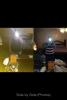
3 wks post op pic

  • Replies 17
  • Views 1.5k
  • Created
  • Last Reply

Featured Replies

Well done! It's great isn't it? I'm almost 3 weeks out, and with the pre op diet, now lost a total of 72lbs! I'm delighted.

wow....amazing progress in only 3 weeks!! how much have you lost?

Well done! It's great isn't it? I'm almost 3 weeks out, and with the pre op diet, now lost a total of 72lbs! I'm delighted.

Wow, that is crazy fast...how long and how much did you loose on your pre-op diet?

Congratulations. I lost 15 pounds in 5 days and several people could not believe it. I can't explain it either, except that I've been on all liquids for most that time. I'm very happy and doing great. Sleeved 9/20/13

I dieted about 4 weeks before op. 2 weeks diet 2 weeks strict milk & yoghurt liver reduction diet. Lost about 42lbs pre-op.

WOW!! after 3 weeks? You look wonderful

Big Andy:

I'm a guy too. I think us men loose faster.

Your possibly right Camper. The first 5-6 days after the op I was slightly heavier then before, then it just started falling.

That is inspiring and hopeful to me that I r happy with your progress. My Surgery is nov 13. Please keep me posted on your journey.bv

Big Andy:

I'm a guy too. I think us men loose faster.

I think we do as well. I am on day 18 (2 of those days pre surgery) and I am down 34 pounds now.

Archived

This topic is now archived and is closed to further replies.

Trending Products

PatchAid Vitamin Patches

Account

Navigation

Search

Search

Configure browser push notifications

Chrome (Android)
  1. Tap the lock icon next to the address bar.
  2. Tap Permissions → Notifications.
  3. Adjust your preference.
Chrome (Desktop)
  1. Click the padlock icon in the address bar.
  2. Select Site settings.
  3. Find Notifications and adjust your preference.