Skip to content
View in the app

A better way to browse. Learn more.

BariatricPal

A full-screen app on your home screen with push notifications, badges and more.

To install this app on iOS and iPadOS
  1. Tap the Share icon in Safari
  2. Scroll the menu and tap Add to Home Screen.
  3. Tap Add in the top-right corner.
To install this app on Android
  1. Tap the 3-dot menu (⋮) in the top-right corner of the browser.
  2. Tap Add to Home screen or Install app.
  3. Confirm by tapping Install.

5 weeks 3days

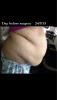
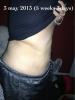
5 weeks down. Feeling a lot more energy than before. Still along way to go. Anyone in the same time line as me?

I went in march 245th

post-51905-13813665261724_thumb.jpg

post-51905-13813665262463_thumb.jpg

  • Replies 11
  • Views 888
  • Created
  • Last Reply

Featured Replies

Oh my goodness...that is amazing!! (My belly is my biggest problem area (and my upper legs).... your pictures are so very encouraging!

5 weeks down. Feeling a lot more energy than before. Still along way to go. Anyone in the same time line as me?

I went in march 245th

Very nice!'

Wow great changes! Don't know how much you've lost, but you've certainly lost inches! I agree with Rebecca -- your pics are VERY encouraging! Especially since you seem to not have any loose skin really. This is very impressive!

Like others have said this gives me hope.. that is amazing congrats :)

Great results ! Congrats

Awesome!

Wow. Was sleeved on the 26th of march and can say I don't think I have lost like that. I have lost 33 lbs.

Great job! To the other posters here...if you haven't started tracking measurements you might consider starting, especially if you plan to exercise. It makes a big difference when the scale doesn't show a lot of movement. I weigh on Monday's and measure on the first of the month. I was sleeved on 3/25 and am down 17.5 lbs but have lost 3" off my waist and 3" off my hips. I also track upper arm, thigh, bra band, and chest. All went down at least an inch since surgery.

Archived

This topic is now archived and is closed to further replies.

Trending Products

PatchAid Vitamin Patches

Account

Navigation

Search

Search

Configure browser push notifications

Chrome (Android)
  1. Tap the lock icon next to the address bar.
  2. Tap Permissions → Notifications.
  3. Adjust your preference.
Chrome (Desktop)
  1. Click the padlock icon in the address bar.
  2. Select Site settings.
  3. Find Notifications and adjust your preference.