




3 Months (Before & After)
- Replies 6
- Views 850
- Created
- Last Reply
Top Posters In This Topic
-
TerryBelieves 1 post
-
Ballermom 1 post
-
Kapoorvilla 1 post
-
moregoodtimes 1 post



Popular Days
Most Popular Posts
-
Wow! Fantastic job! Wishing you continued success.
-
Great job! Keep it up!
-
Wow you look great! The weight loss is very impressive. Congrats
Posted Images
Featured Replies
Join the conversation
You can post as a guest; create a free account to track replies, follow topics, and be part of the largest weight loss surgery community.
Hey fellow VSTers,
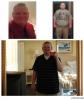
Just a quick update for everyone. I'm scheduled for my 3 month post op follow up tomorrow and wanted to post some before/after photos for everyone.
Starting Weight: 368
Day of Surgery: 340
Today: 264
I've been very pleased with the progress so far. 76lbs since surgery and 104lbs from start of journey. I was sleeved October 17th.
For anyone still debating, this was absolutely the best decision of my life!
Thanks,
Jonathan