Skip to content
View in the app

A better way to browse. Learn more.

BariatricPal

A full-screen app on your home screen with push notifications, badges and more.

To install this app on iOS and iPadOS
  1. Tap the Share icon in Safari
  2. Scroll the menu and tap Add to Home Screen.
  3. Tap Add in the top-right corner.
To install this app on Android
  1. Tap the 3-dot menu (⋮) in the top-right corner of the browser.
  2. Tap Add to Home screen or Install app.
  3. Confirm by tapping Install.

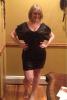
8 months out pic

  • Replies 26
  • Views 2.3k
  • Created
  • Last Reply

Featured Replies

Beautiful! You look really good, Congrats on your success!!

This was the best decision of my life!! It was the catalyst for me to get my life in order.

[attachment=7542:

108lbs!!!

So, when are you taking me out to the club? ;)

Hot Hot Hot! Amazing job. Just keep doing everything you are doing.

You look great! And it gives me hope because it looks like you got to keep the girls! Lol good job!

You look amazing!!

You look perfect!

Wow!!!

Wow, smokin'! Where's the before photo so we can ooh and aah about your transformation?

Wow you look great ..

That's a huge hange in 8 mos!!!!

I can't wait to have this surgery!!!

awesome can't wait untill I hit my 8 months post op.

your picture weight is 108 or are you 108 down?

just wondering either way u look great keep up the good work

How much do you evercise to get where you are now?

This was the best decision of my life!! It was the catalyst for me to get my life in order.

[attachment=7542:

108lbs!!!

Amazing success! What's your secret? I'm right at your starting & will be sleeved 1/8/13. Would love to know your exercise & meal plan.

Archived

This topic is now archived and is closed to further replies.

Trending Products

PatchAid Vitamin Patches

Account

Navigation

Search

Search

Configure browser push notifications

Chrome (Android)
  1. Tap the lock icon next to the address bar.
  2. Tap Permissions → Notifications.
  3. Adjust your preference.
Chrome (Desktop)
  1. Click the padlock icon in the address bar.
  2. Select Site settings.
  3. Find Notifications and adjust your preference.