Skip to content
View in the app

A better way to browse. Learn more.

BariatricPal

A full-screen app on your home screen with push notifications, badges and more.

To install this app on iOS and iPadOS
  1. Tap the Share icon in Safari
  2. Scroll the menu and tap Add to Home Screen.
  3. Tap Add in the top-right corner.
To install this app on Android
  1. Tap the 3-dot menu (⋮) in the top-right corner of the browser.
  2. Tap Add to Home screen or Install app.
  3. Confirm by tapping Install.

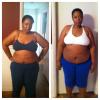
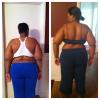
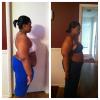
2.5 week pics

The scale isn't really talking to me do I took everyone's advice and took pics. The white sports bra pic was the night before surgery. The navy (pajamas....ok I know that's tacky but I wanted the pics NOW and didn't want to change LOL) pic is this morning!!!!!

post-345422-13813142036868_thumb.jpg

post-345422-1381314203787_thumb.jpg

post-345422-13813142038838_thumb.jpg

  • Replies 14
  • Views 1.6k
  • Created
  • Last Reply

Featured Replies

Wow! Hope that reassured you, because you are looking great!

  • Author
Wow! Hope that reassured you' date=' because you are looking great![/quote']

I was honestly surprised! And definitely feeling reassured!

Look at the difference already.....that is amazing...keep up the awesome job and keep sharing those pics.....

  • Author
Look at the difference already.....that is amazing...keep up the awesome job and keep sharing those pics.....

Thanks!

you are lookin great!

WOW!!! AMAZING!!! Keep it up!

Great, now keep going. :)

Thanks for sharing! That made me feel better, my scale doesn't sing to me either. I can feel the weight shifting and my pants have to be made tighter and shirts are hanging off me.

Keeping up the motivation!!

You are looking wonderful! So excited for you!

Don't worry abt that scale ' u are doing amazing ! Keep it up !

Well, there definitely is a difference and you're looking better!

Keep going! Great job! You're looking fantastic!

You look great.

Archived

This topic is now archived and is closed to further replies.

Trending Products

PatchAid Vitamin Patches

Account

Navigation

Search

Search

Configure browser push notifications

Chrome (Android)
  1. Tap the lock icon next to the address bar.
  2. Tap Permissions → Notifications.
  3. Adjust your preference.
Chrome (Desktop)
  1. Click the padlock icon in the address bar.
  2. Select Site settings.
  3. Find Notifications and adjust your preference.