Skip to content
View in the app

A better way to browse. Learn more.

BariatricPal

A full-screen app on your home screen with push notifications, badges and more.

To install this app on iOS and iPadOS
  1. Tap the Share icon in Safari
  2. Scroll the menu and tap Add to Home Screen.
  3. Tap Add in the top-right corner.
To install this app on Android
  1. Tap the 3-dot menu (⋮) in the top-right corner of the browser.
  2. Tap Add to Home screen or Install app.
  3. Confirm by tapping Install.

Join BariatricPal free

  • Ask your own questions
  • Reply and follow topics
  • Message other members
  • No cost, no spam

KATEJ71

Gastric Sleeve Patients
  • Joined

  • Last visited

  1.    darstvader reacted to a post in a topic: Before and After Pics
  2.    Malin reacted to a post in a topic: Before and After Pics
  3.    mobella reacted to a post in a topic: Before and After Pics
  4.    RonnieRab reacted to a post in a topic: Before and After Pics
  5.    RonnieRab reacted to a post in a topic: Before and After Pics
  6.    RonnieRab reacted to a post in a topic: Before and After Pics
  7.    MightyMittenMimi reacted to a post in a topic: Before and After Pics
  8.    BigTink2LilTink reacted to a post in a topic: Before and After Pics
  9.    VSGAnn2014 reacted to a post in a topic: Before and After Pics
  10.    sweesee reacted to a post in a topic: Before and After Pics
  11. that's one of my goals, being photographed without hating it! ????
  12. and we are always our worst critic...I bet you're nowhere near what you "think" you look like!
  13.    KATEJ71 reacted to a post in a topic: Before and After Pics
  14. @BigViffer...I did, but for some reason only got a small X...Microsoft, go figure This time it worked, thanks for reposting my pic for me though...much appreciated.
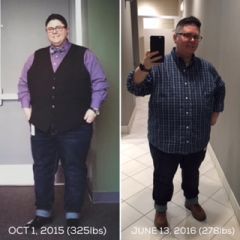
  15. Starting to feel more confident with full body pics...here's a recent comparison from October of last year to this Monday. Surgery was 04/25/16 (gastric sleeve) and I'm down 48 lbs (I'm 276 this morning) and counting!

Account

Navigation

Search

Search

Configure browser push notifications

Chrome (Android)
  1. Tap the lock icon next to the address bar.
  2. Tap Permissions → Notifications.
  3. Adjust your preference.
Chrome (Desktop)
  1. Click the padlock icon in the address bar.
  2. Select Site settings.
  3. Find Notifications and adjust your preference.