KATEJ71
Gastric Sleeve Patients
-
Joined
-
Last visited
Everything posted by KATEJ71
-
that's one of my goals, being photographed without hating it! ????
-
and we are always our worst critic...I bet you're nowhere near what you "think" you look like!
-
@BigViffer...I did, but for some reason only got a small X...Microsoft, go figure This time it worked, thanks for reposting my pic for me though...much appreciated.
-
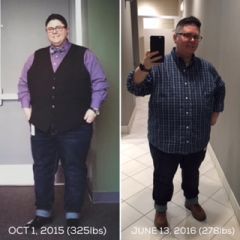
Starting to feel more confident with full body pics...here's a recent comparison from October of last year to this Monday. Surgery was 04/25/16 (gastric sleeve) and I'm down 48 lbs (I'm 276 this morning) and counting!
-
KATEJ71, a weight loss surgery photo album by KATEJ71 on BariatricPal. 1 photo in Before and After Gastric Sleeve Photos.
-
I'm chewing gum AND typing this at the same time! I don't have gum everyday, just occasionally after lunch at work and have had zero problems...although my tummy always seems to be complaining about one thing or another...I'm hungry, I'm full...blah, blah, blah. I chew Trident Perfect Peppermint.
-
I should not have clicked on this post because it made me laugh, which made my stomach hurt (sleeved 04/25/16) Sent from my iPad using the BariatricPal App
-
it's not Tylenol, but I love Tiger Balm, it's a rub like Ben Gay...it really helps relieve those achy muscles, headaches, etc. It smells pretty strong, but so worth it. You can find it at CVS, Walgreen's, Walmart, etc. Oh, and Epsom salt baths...especially the eucalyptus spearmint scent works wonders as well.
-
"...I've been told directly to my face by a woman who absolutely loved my personality that she could never date me because of my size alone. She continued to tell me about how much of an amazing connection she felt to me for a few years, but never once considered rethinking her stance." @@Sandi73, I seriously hope you kicked that judgmental ****** to the curb...no one needs that kind of passive-aggressive negativity...(like oh, you COULD have a relationship with ME if only YOU looked a CERTAIN way)...pffft, who is this chick, the Gods gift to women? There's no reason you should stop yourself from looking...the right person is out there...trust me, if I could find someone...so can you...and that person should love you no matter what you look like...I mean, you can be skinny all you want and still be ugly (case in point).
-
Just got my date today, April 25th here I come!
-
I had my evaluation today...I filled out a health questionnaire with questions about how I feel my eating habits are, etc...then I had about an hour chat with the psychologist and then a 175 MCMI-III questionnaire and was done. The psychologist said she would recommend me for surgery and strongly suggested I seek counseling/support group to overcome my binge-eating habits and consult with a dietitian, otherwise I can expect to gain the weight back.
-
And so imagine all you are going through now, but before you had your surgery and how much harder it would be if this were happening pre-surgery...and then take a deep breath, be proud of yourself, you've come this far!
-
I would not recommend True Results. They were great up front, but when I showed up for my initial appointment, I waited in their lobby for 30 minutes with no explanation. I just felt like a number to them and went directly to the source, which is the Nicholson Clinic. Dr. Nicholson was great and the staff was very pleasant as well. I've had no issues so far and I'm in the process of making my appointments for pre-surgery requirements. My initial appointment with Dr. Nicholson was very brief, but I had already done my research and knew I wanted the sleeve and I've not had any prior abdominal surgeries, so he asked, when do you want to do it and I said ASAP. I also did a bit of research here on BariatricPal and Google about Dr. Nicholson and could not find one bad review. Good Luck! Ooops, I almost forgot! Here's their website: http://www.nicholsonclinic.com/
-
I'm on my way to Best Buy to pick up my Jawbone UP2! I'm a tech geek and now have a reason to justify the purchase! ???? I'm also very curious about my sleep because my doctor keeps asking if I snore...she suspects sleep apnea due to my neck size...I'm hoping the UP2 will give me a little insight...and I'm the kind of person that likes to see numbers (i.e.: steps, calories, etc) So here's the 5 main reasons I chose the Jawbone UP line over Fitbit: 1) it's slimmer 2) I don't need text/call alerts 3) the UP app is superior to The Fitbit app, especially when adding food 4) it has an adjustable strap which shrinks with you (you know, for when you're all skinny and stuff ????) Fitbit makes you choose either a small, medium or XL and the XL is only available with certain models 5) the UP2 now automatically knows when you are asleep (same as Fitbit) Here's a good article by PC Mag on fitness trackers http://mobile.pcmag.com/reviews/55853-best-fitness-trackers-for-2015?origref= I also watched YouTube videos that helped me narrow it down to exactly what I was looking for. Happy Tracking!