Skip to content
View in the app

A better way to browse. Learn more.

BariatricPal

A full-screen app on your home screen with push notifications, badges and more.

To install this app on iOS and iPadOS
  1. Tap the Share icon in Safari
  2. Scroll the menu and tap Add to Home Screen.
  3. Tap Add in the top-right corner.
To install this app on Android
  1. Tap the 3-dot menu (⋮) in the top-right corner of the browser.
  2. Tap Add to Home screen or Install app.
  3. Confirm by tapping Install.

Join BariatricPal free

  • Ask your own questions
  • Reply and follow topics
  • Message other members
  • No cost, no spam

Fawn1120

Gastric Sleeve Patients
  • Joined

  • Last visited

  1.    voldemort reacted to a gallery image: image.jpg
  2.    danaevett reacted to a gallery image: image.jpg
  3.    danaevett reacted to a gallery image: image.jpg
  4.    rmc32587 reacted to a gallery image: image.jpg
  5. Images added to a gallery album owned by Fawn1120 in Before and After Gastric Sleeve Photos
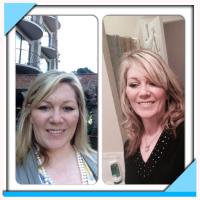
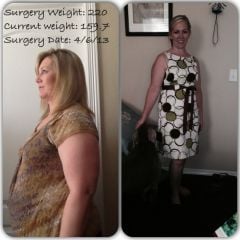
    Fawn1120, a weight loss surgery photo album by Fawn1120 on BariatricPal. 6 photos in Before and After Gastric Sleeve Photos.
  6.    Fawn1120 reacted to a blog entry: Half Way Through Pre-Op Diet
  7. I thought one of my relatives was getting sleeved when I read Fahn by 40! My maiden name is Fahn. So, that's why my user name is Fawn, so people know how to pronounce it. Fahn is my nick name. I love your definition of Fahn! And you will be Fahn By 40!
  8. Well stated! I like the analogy about food commercials. You are so right! Love your soap box!
  9. Every step adds up! I needed to find my pedometer!

Account

Navigation

Search

Search

Configure browser push notifications

Chrome (Android)
  1. Tap the lock icon next to the address bar.
  2. Tap Permissions → Notifications.
  3. Adjust your preference.
Chrome (Desktop)
  1. Click the padlock icon in the address bar.
  2. Select Site settings.
  3. Find Notifications and adjust your preference.