Start here
Where are you in your journey?
Choose the path that fits today. We’ll take you to the most useful discussions.
- GLP-1 medication Zepbound, Wegovy, access, side effects, progress, and support.
- Before surgery Compare procedures, plan ahead, and get honest pre-op answers.
- Post-op Recovery, food stages, symptoms, and support.
- Long-term Regain, labs, habits, and life after the honeymoon.
- Revision Explore revision options, complications, and next steps.

stokesmommy
LAP-BAND Patients
-
Joined
-
Last visited
-
that is a great goal I might just add. fit into wedding dress.. ilike congrats keep it up
-
I don't actually use those bottles I use the through away smart Water. I just write with a permanent market.. also not banded yet
-
that first word was fiberonebars
-
riverine brownies does the trick
-
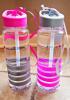
I do this with smart Water bottles [ATTACH]24701[/ATTACH]
-
Mmm sonic chili dog.
-
I have a lotion that says it has something special in it to help with elasticity. its walmart brand
-
Can you add banana to shake in liquid stage?
-
Don't do just chicken by it self add you veggies or put it in your soup. Imagine poor a can of prejudice soup in all of it noodles broth chicken. Blend till mushie not liquified and eat. All your doing is pre chewying. We are human so we could make a mistake and not chew enough at the beginning so let you're blender do the work
-
What's band with plications??
-
I have read that the port can be placed by the shoulder can anyone explain.
-
Today was my first appointment with the nutritionist. I finally know what to expect. I have a the month supervised diet How much did you lose
-
Man cell phone spell check suck I live by kolb and willmott
-
I live way poverty by kolb willmott area
-
I tried chobani honey greek yogurt today...gag never again. Thanks for the tip