




Skip to content
View in the app

A better way to browse. Learn more.

BariatricPal

A full-screen app on your home screen with push notifications, badges and more.

To install this app on iOS and iPadOS
  1. Tap the Share icon in Safari
  2. Scroll the menu and tap Add to Home Screen.
  3. Tap Add in the top-right corner.
To install this app on Android
  1. Tap the 3-dot menu (⋮) in the top-right corner of the browser.
  2. Tap Add to Home screen or Install app.
  3. Confirm by tapping Install.

Through the Looking Glass?My Metal Images
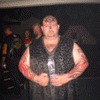
So I work is screwing with me again and I had to cancel my pre-op. I should be able to reschedule and still make June 8th. I am very happy with my pre-op weight loss (43 lbs.), I feel great and being focused on surgery prep has really helped me keep my weight in line. The funny thing is I fell kind of scrawny right now…I know that is not the case…and the picture below validates this.


I am sitting on the couch with a guy about my height and about half my weight (I am 330 right now). It is a great trip through the looking glass and how distorted our self image can be, and then become if you have success with the band.

2 Comments

Recommended Comments

Cingulus

LAP-BAND Patients

So I work is screwing with me again and I had to cancel my pre-op. I should be able to reschedule and still make June 8th. I am very happy with my pre-op weight loss (43 lbs.), I feel great and being focused on surgery prep has really helped me keep my weight in line. The funny thing is I fell kind of scrawny right now…I know that is not the case…and the picture below validates this.

I am sitting on the couch with a guy about my height and about half my weight (I am 330 right now). It is a great trip through the looking glass and how distorted our self image can be, and then become if you have success with the band.

John337

LAP-BAND Patients

Keep up the good work.....You know it's worth it...

Guest
Add a comment...

Account

Navigation

Search

Search

Configure browser push notifications

Chrome (Android)
  1. Tap the lock icon next to the address bar.
  2. Tap Permissions → Notifications.
  3. Adjust your preference.
Chrome (Desktop)
  1. Click the padlock icon in the address bar.
  2. Select Site settings.
  3. Find Notifications and adjust your preference.