




Skip to content
View in the app

A better way to browse. Learn more.

BariatricPal

A full-screen app on your home screen with push notifications, badges and more.

To install this app on iOS and iPadOS
  1. Tap the Share icon in Safari
  2. Scroll the menu and tap Add to Home Screen.
  3. Tap Add in the top-right corner.
To install this app on Android
  1. Tap the 3-dot menu (⋮) in the top-right corner of the browser.
  2. Tap Add to Home screen or Install app.
  3. Confirm by tapping Install.

Start here

Where are you in your journey?

Choose the path that fits today. We’ll take you to the most useful discussions.

Made it Through the Super Bowl!

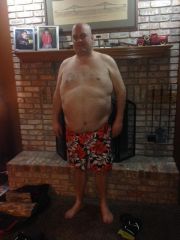
Man that Superbowl was a blowout! And so has my first three days of pre-op liquid diet been. I jumped on the scale this morning and it read 285.0 which is 6 #'s less than where I started on Jan 31st. I'm very pleased. I managed to get some good exercise over the weekend shoveling snow and chopping wood for the fireplace. Tonight I hope to get to the gym for a cardio workout. This all sounds really good and it is. But, I must say there are times when the cravings are really strong. So far my will power is in check and each day I gain the confidence I can keep this rolling to the surgery date. I'll check back in on Wednesday. Until then, good luck to everyone in the same boat!

Images

  1. Pre Op 2014.01.30
View the entire My Lap-Band Journey album

2 Comments

Recommended Comments

Sharpie

LAP-BAND Patients

You Can do it... If you keep your eye on the prize.. the prize is your health... We are all rooting for you.

Guest
Add a comment...

Account

Navigation

Search

Search

Configure browser push notifications

Chrome (Android)
  1. Tap the lock icon next to the address bar.
  2. Tap Permissions → Notifications.
  3. Adjust your preference.
Chrome (Desktop)
  1. Click the padlock icon in the address bar.
  2. Select Site settings.
  3. Find Notifications and adjust your preference.