Skip to content
View in the app

A better way to browse. Learn more.

BariatricPal

A full-screen app on your home screen with push notifications, badges and more.

To install this app on iOS and iPadOS
  1. Tap the Share icon in Safari
  2. Scroll the menu and tap Add to Home Screen.
  3. Tap Add in the top-right corner.
To install this app on Android
  1. Tap the 3-dot menu (⋮) in the top-right corner of the browser.
  2. Tap Add to Home screen or Install app.
  3. Confirm by tapping Install.

Day 1 Of Liquid Diet
blogs/blog-0193156001341233934.jpgJust started the 2 week liquid diet and I am both nervous and excited for it. I'm nervous because I know that I get really cranky and moody when I don't eat not to mention the headaches and dizziness. I am obviously excited for two reasons: 1 I am only 2 weeks away from the surgery and my life will begin to completely change and 2 because I know through this liquid diet I will loose a bunch of weight in just 2 weeks.


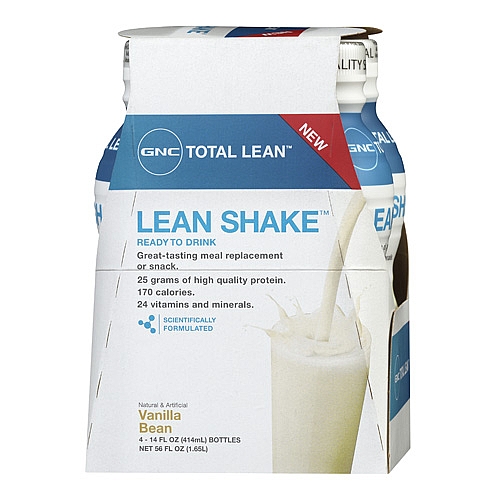
For my first "meal" I decided to go with the GNC Total Lean ready to drink Vanilla Bean. Its actually not bad at all. It is thinner than I thought it would be. I was expecting a thick and gritty shake but it is actually more like 1% of skim milk.


GNC Total Lean Shake - 4 pack for $9.99

4 Comments

Recommended Comments

xsentrick

LAP-BAND Patients

Congrats and welcome to your journey!

pjenkinson1970

LAP-BAND Patients

I Love GNC Lean shakes, My dr. is reccomending Unjury shakes. I'm sort of picky about my shakes so the lean shakes are good for the 2 week pre-op liquid diet? I also like the BSN dessert shakes they are low carb but I don't know if they are reccommended. I could use all the help I can get on this topic.

OCPrincess

LAP-BAND Patients

Hi, I am on my 5th day of liquids pre-surgery. My surgery is scheduled on July 19th... when is your's scheduled?

nyangela426

LAP-BAND Patients

Hi, I am on my 5th day of liquids pre-surgery. My surgery is scheduled on July 19th... when is your's scheduled?

My surgery is July 16th.

Guest
Add a comment...

Account

Navigation

Search

Search

Configure browser push notifications

Chrome (Android)
  1. Tap the lock icon next to the address bar.
  2. Tap Permissions → Notifications.
  3. Adjust your preference.
Chrome (Desktop)
  1. Click the padlock icon in the address bar.
  2. Select Site settings.
  3. Find Notifications and adjust your preference.