




Dear 200's And My 20's,
By Amanda61082
· 411 views
Dear 200's and my 20's,
I have been with both of you for ten years. We have been through a lot. I made a list:
-Met my husband
-9/11
-My husband being overseas
-Graduating with my Bachelors
-My father suffering a stroke in his brain stem
-Getting married
-Moving across the country
-Buying a house
-Having my handsome son
-Moving back home
-My son having a gran mal seizure in my arms, and starting a rollar coaster of appointments and specialists
-Having my beautiful daughter
-Buying another house
-Experencing the fear of my father undergoing an aorta replacement and triple bypass surgery
-My son being seizure and medication free
-Having ankle surgery
-Witnessing someone pass away
-Suffering from a blood clot
-Graduating with my Master's
-Having lapband surgery that has and will continue to change my life forever
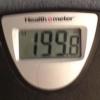
We have been through so much over the past decade, and even though some times were amazing and life changing, I am ready to move on and start a new chapter. I am 3 weeks from 30 and 1.5lbs away from 199, and I can't help that them happening at the same time is a sign. A sign that I am ready to begin my new life with my husband and kids, and experience life healthier and happier with my friends and family.
So Good-bye 200's and my 20's, it has been real, but it is time I move on.
Amanda

Recommended Comments