




Skip to content
View in the app

A better way to browse. Learn more.

BariatricPal

A full-screen app on your home screen with push notifications, badges and more.

To install this app on iOS and iPadOS
  1. Tap the Share icon in Safari
  2. Scroll the menu and tap Add to Home Screen.
  3. Tap Add in the top-right corner.
To install this app on Android
  1. Tap the 3-dot menu (⋮) in the top-right corner of the browser.
  2. Tap Add to Home screen or Install app.
  3. Confirm by tapping Install.

Join BariatricPal free

  • Ask your own questions
  • Reply and follow topics
  • Message other members
  • No cost, no spam

I'm doing okay, but stil struggling
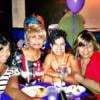
I have lost a total of 15lbs without a fill so far, but I am struggling to fight the urge of bad eating habits. I am constantly around food, especially at work. Everywhere I go somebody is eating....uuugggghhh. So I am trying to break the habit of joining in on the eating game. I've noticed lately that I have been so hungry and I am not satisfied after eating. Can't wait for my fill, which is on 5/4/2011; maybe that will help some of my hungry pains. Today, I am going to my nephew's bday party. I hope I can fight urge to say no to something I know I shouldn't eat. I wish myself luck. To be continued.....

2 Comments

Recommended Comments

cindys5

LAP-BAND Patients

I am still on puree foods and had a wedding this week-end. It is hard to eat baby food when everyone else is eating prime rib, I feel your pain! I go on 5/11 to get my first fill. My five kids....monitor everything I eat and it is a bit annoying but it does keep me in check! lol

Cindy

Carerjem

LAP-BAND Patients

well donefor the weight loss . your so lucky ||||||||||||||

i tend to snack more

Hoping first fill on the 6th of may will help

Guest
Add a comment...

Account

Navigation

Search

Search

Configure browser push notifications

Chrome (Android)
  1. Tap the lock icon next to the address bar.
  2. Tap Permissions → Notifications.
  3. Adjust your preference.
Chrome (Desktop)
  1. Click the padlock icon in the address bar.
  2. Select Site settings.
  3. Find Notifications and adjust your preference.