Skip to content
View in the app

A better way to browse. Learn more.

BariatricPal

A full-screen app on your home screen with push notifications, badges and more.

To install this app on iOS and iPadOS
  1. Tap the Share icon in Safari
  2. Scroll the menu and tap Add to Home Screen.
  3. Tap Add in the top-right corner.
To install this app on Android
  1. Tap the 3-dot menu (⋮) in the top-right corner of the browser.
  2. Tap Add to Home screen or Install app.
  3. Confirm by tapping Install.

4 Comments

Recommended Comments

Guest LapBandFan

Guest LapBandFan

Guests

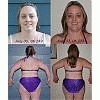
The incredible shrinking woman!! Great job. Keep up the great work! By this time next year you will be stunning, but how a about taking pics of front and side view too, can really tell difference when you do that. I did the three different poses on my journey and it is so encouraging to see yourself shrinking as you look back over the pics along the way.

May God bless you on your Journey to Thinness!

LittleBird

LAP-BAND Patients

I have photos of the other angles, but only did this one...I'll get the others up there if more would like to see.

Guest

Guest

Guests

You go girl, you are doing this thing. I can see your shoulders coming. Isn't it crazy where we store fat. LOL

Guest
Add a comment...

Account

Navigation

Search

Search

Configure browser push notifications

Chrome (Android)
  1. Tap the lock icon next to the address bar.
  2. Tap Permissions → Notifications.
  3. Adjust your preference.
Chrome (Desktop)
  1. Click the padlock icon in the address bar.
  2. Select Site settings.
  3. Find Notifications and adjust your preference.