




Skip to content
View in the app

A better way to browse. Learn more.

BariatricPal

A full-screen app on your home screen with push notifications, badges and more.

To install this app on iOS and iPadOS
  1. Tap the Share icon in Safari
  2. Scroll the menu and tap Add to Home Screen.
  3. Tap Add in the top-right corner.
To install this app on Android
  1. Tap the 3-dot menu (⋮) in the top-right corner of the browser.
  2. Tap Add to Home screen or Install app.
  3. Confirm by tapping Install.

Join BariatricPal free

  • Ask your own questions
  • Reply and follow topics
  • Message other members
  • No cost, no spam
  • Entries

    2
  • Comments

    0
  • Views

    1216

About this blog

my journey

Entries in this blog
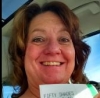
My hospital stay was good. I didnt have to decide anything everything was taken care of. i was taken care of. Like a mini vacation for me. my favorite part was the sugar free popsicles. so good not hungry just dry mouth.
My name is Kelly, starting weight 225 lbs. i am 5'5 and turning 50 years old this year. I was so nervous for the surgery. Scared to death actually. When I arrived in my hospital room after recovery I was just thankful to be alive. It was silly really because my surgeon said it was a text book case and everything went really well. I had no pain at first. In fact the sutures were not my problem. It was the gas left over from the surgery that was the most painful. But after about 5 d

Account

Navigation

Search

Search

Configure browser push notifications

Chrome (Android)
  1. Tap the lock icon next to the address bar.
  2. Tap Permissions → Notifications.
  3. Adjust your preference.
Chrome (Desktop)
  1. Click the padlock icon in the address bar.
  2. Select Site settings.
  3. Find Notifications and adjust your preference.