




Skip to content
View in the app

A better way to browse. Learn more.

BariatricPal

A full-screen app on your home screen with push notifications, badges and more.

To install this app on iOS and iPadOS
  1. Tap the Share icon in Safari
  2. Scroll the menu and tap Add to Home Screen.
  3. Tap Add in the top-right corner.
To install this app on Android
  1. Tap the 3-dot menu (⋮) in the top-right corner of the browser.
  2. Tap Add to Home screen or Install app.
  3. Confirm by tapping Install.
  • Entries

    4
  • Comments

    20
  • Views

    2,592

About this blog

on this stage

Entries in this blog
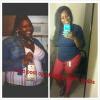
i am SO HAPPY! i am now down 42 pounds. including pre op diet started october 27th. i go to the gym everyday. never skip a beat i love my sleeve. im so happy and grateful. i even had to buy new gym clothes because my others were fallin off! ahhhhhh i do NOT get 60 grams of protein a day but i TRY my best. and i switch up protein shakes just to avoid nausea and feeling sick! im sooooooooo excited. and wanted to share my joy   including another before taken at my job's 80th anniversary party.
i need to get this ALL out before i insane. or i guess to prove that im NOT insane. nor do i have BEHAVIORAL ISSUE. lol i cant believe this. UGH anyways. lets start from September 5th. September 5th was the last day of my 6 month NUT visits. completed and faxed over to my Surgeons office the same morning. September 6th. I gave it a day and didnt call them. They received my paperwork but again i never called the Surgeons office because I was told my paperwork was complete and would be given to

Account

Navigation

Search

Search

Configure browser push notifications

Chrome (Android)
  1. Tap the lock icon next to the address bar.
  2. Tap Permissions → Notifications.
  3. Adjust your preference.
Chrome (Desktop)
  1. Click the padlock icon in the address bar.
  2. Select Site settings.
  3. Find Notifications and adjust your preference.