




Skip to content
View in the app

A better way to browse. Learn more.

BariatricPal

A full-screen app on your home screen with push notifications, badges and more.

To install this app on iOS and iPadOS
  1. Tap the Share icon in Safari
  2. Scroll the menu and tap Add to Home Screen.
  3. Tap Add in the top-right corner.
To install this app on Android
  1. Tap the 3-dot menu (⋮) in the top-right corner of the browser.
  2. Tap Add to Home screen or Install app.
  3. Confirm by tapping Install.

Join BariatricPal free

  • Ask your own questions
  • Reply and follow topics
  • Message other members
  • No cost, no spam
  • Entries

    2
  • Comment

    1
  • Views

    1420

About this blog

bjoanna's Blog, a weight loss surgery blog by bjoanna on BariatricPal. 2 entries on surgery, recovery and progress.
Entries in this blog

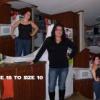
i was banded march 30,11 i weighed in at 234 - i wore a size 18 pants. since im down 37 lbs. i jog regulary im more active and im a size 13 but why dont i feel smaller. .? i have 47 more lbs to go my goal is 150. i see pics and i see the difference sometimes... will i get more confidence?? i love my band but i still think im a food addict... i also know the band saved my life... i m no longer a diabetic or have high bp.. but i want to feel like a new me on the inside?    

Account

Navigation

Search

Search

Configure browser push notifications

Chrome (Android)
  1. Tap the lock icon next to the address bar.
  2. Tap Permissions → Notifications.
  3. Adjust your preference.
Chrome (Desktop)
  1. Click the padlock icon in the address bar.
  2. Select Site settings.
  3. Find Notifications and adjust your preference.