Skip to content
View in the app

A better way to browse. Learn more.

BariatricPal

A full-screen app on your home screen with push notifications, badges and more.

To install this app on iOS and iPadOS
  1. Tap the Share icon in Safari
  2. Scroll the menu and tap Add to Home Screen.
  3. Tap Add in the top-right corner.
To install this app on Android
  1. Tap the 3-dot menu (⋮) in the top-right corner of the browser.
  2. Tap Add to Home screen or Install app.
  3. Confirm by tapping Install.

Protein - how to keep track

  • Replies 5
  • Views 1.5k
  • Created
  • Last Reply

Top Posters In This Topic

Most Popular Posts

  • catwoman7
    catwoman7

    I track everything I eat and drink in MyFitnessPal. It calculates all the macros for you.

  • catwoman7
    catwoman7

    I use the Web version because I'm mostly on my laptop, so it always shows up there. I only use the cell phone app version when I'm away from home and eating something that's off plan, so I won't forge

  • FutureSylph
    FutureSylph

    Only if you're adding foods that aren't already in the database. (Most are -- it's just a matter of finding them.)

Posted Images
Featured Replies

I track everything I eat and drink in MyFitnessPal. It calculates all the macros for you.

  • Author

I track everything I eat and drink in MyFitnessPal. It calculates all the macros for you.

I tried that one and it requires you to add in how much protein, is that right?
I thought there'd be an app that automatically calculates the protein


Sent from my SM-S908E using BariatricPal mobile app

5 hours ago, elesir8 said:

I tried that one and it requires you to add in how much Protein, is that right?

Only if you're adding foods that aren't already in the database. (Most are -- it's just a matter of finding them.)

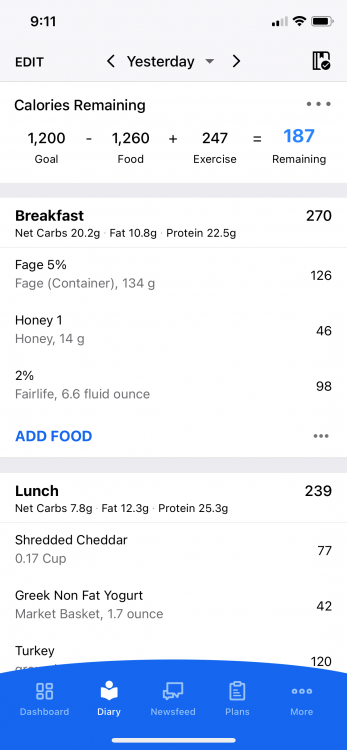
You may have to play around with the settings to get it to show more easily. It's easier if you have the premium subscription, but I know you can do it without that. Their support team is really good, so if you can't figure it out, reach out to them. Here you can see that the grams of protein for each meal is listed but if you click on each food you can see it. If you scroll down to the bottom of the page and click on "nutrition" it will show you the macros and micronutrients for the day so far.

MFP.thumb.png.140dd8f3d638bb85f14390861d02ce34.png

I use the Web version because I'm mostly on my laptop, so it always shows up there. I only use the cell phone app version when I'm away from home and eating something that's off plan, so I won't forget to add it when I get home. However, you can see the protein there (on the app version) if you scroll to the bottom of the food diary page and click on "Nutrition" (it gives you the whole breakdown).

and yes - there are thousands of items in the database - and those would all include the protein in them. I almost never have to add anything manually.

Edited by catwoman7

Join the conversation

You can post now and register later. If you have an account, sign in now to post with your account.

Guest
Reply to this topic...

Trending Products

PatchAid Vitamin Patches

Account

Navigation

Search

Search

Configure browser push notifications

Chrome (Android)
  1. Tap the lock icon next to the address bar.
  2. Tap Permissions → Notifications.
  3. Adjust your preference.
Chrome (Desktop)
  1. Click the padlock icon in the address bar.
  2. Select Site settings.
  3. Find Notifications and adjust your preference.