Skip to content
View in the app

A better way to browse. Learn more.

BariatricPal

A full-screen app on your home screen with push notifications, badges and more.

To install this app on iOS and iPadOS
  1. Tap the Share icon in Safari
  2. Scroll the menu and tap Add to Home Screen.
  3. Tap Add in the top-right corner.
To install this app on Android
  1. Tap the 3-dot menu (⋮) in the top-right corner of the browser.
  2. Tap Add to Home screen or Install app.
  3. Confirm by tapping Install.
  • Appearance

Join BariatricPal free

  • Ask your own questions
  • Reply and follow topics
  • Message other members
  • No cost, no spam

Tracking Intake

What does everyone use to track their food and fluid intake? I am scheduled for 3 days from now and haven't found anything for tracking yet.

  • Replies 8
  • Views 1.3k
  • Created
  • Last Reply

Top Posters In This Topic

Most Popular Posts

  • I love the MyFitnessPal app, but a lot of people use Baritastic. They are pretty similar and really easy to use. You can search for a food or, if it has a barcode, just scan the barcode and it will

  • My surgery isn't scheduled until 2/22, but I found this on on Amazon and it is amazing! I find that I am not consistent with the app tracking and better at tracking with pen/paper, especially if I ha

  • LaoDaBeirut
    LaoDaBeirut

    I use the LoseIt app on my phone.

Posted Images
Featured Replies

I love the MyFitnessPal app, but a lot of people use Baritastic. They are pretty similar and really easy to use. You can search for a food or, if it has a barcode, just scan the barcode and it will automatically calculate the nutrition information for the serving size you enter.

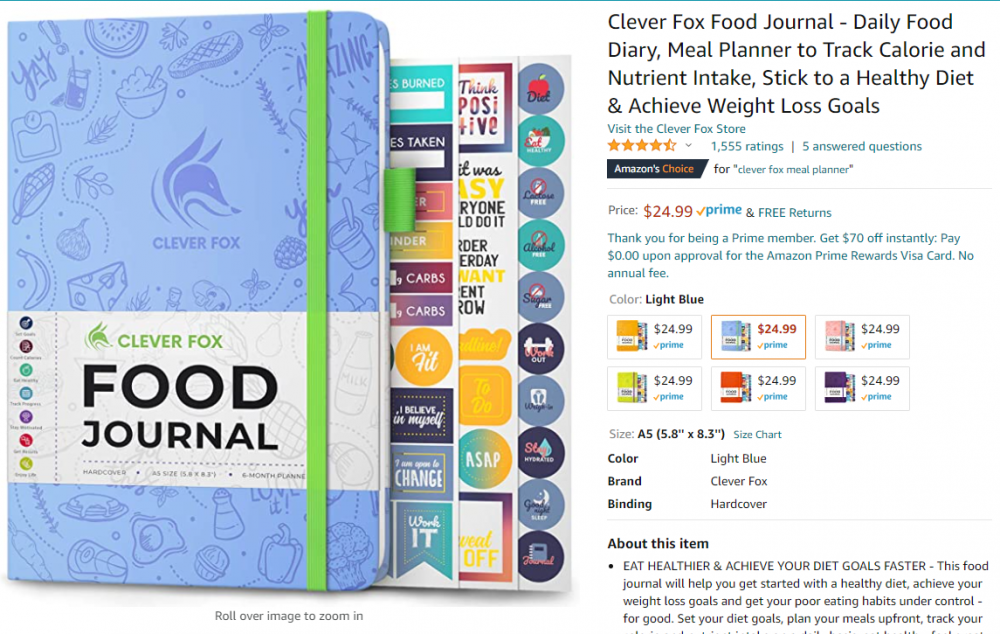
My surgery isn't scheduled until 2/22, but I found this on on Amazon and it is amazing! I find that I am not consistent with the app tracking and better at tracking with pen/paper, especially if I have something that is functional and pretty... this fits the bill! It is a little more expensive than most trackers - but it is undated and it is hard covered. It doesn't have much room for activity tracking, but I created my own separate activity dot journal that I got at Michaels for super cheap.

link: https://www.amazon.com/gp/product/B07Y26M89X/ref=ppx_yo_dt_b_asin_title_o04_s01?ie=UTF8&th=1&psc=1

image.thumb.png.a8b6e502e920db45a57e1347a84f3616.png

I use the LoseIt app on my phone.

Baritastic app for iOS.

I'm a gamer, so I use the Habitica app. I set my own goals including difficulty settings (I'm disabled/ fibromyalgia too) so I have tasks/ achievements for when I take my vitamins, have a protein shake, make my other protein goals, water intake, exercise etc. I get "experience" points and my character levels up, earns pets, mounts, items etc. I've just started using it and it's been a real help.

Edited by Suzi_the_Q

I have used cronometer and baritastic in the past, but since I wear a fitbit I started just using the fitbit app so I have one less thing to mess with.

Join the conversation

You can post as a guest; create a free account to track replies, follow topics, and be part of the largest weight loss surgery community.

Join the conversation

You can post now and register later. If you have an account, sign in now to post with your account.

Guest
Reply to this topic...

Account

Navigation

Search

Search

Configure browser push notifications

Chrome (Android)
  1. Tap the lock icon next to the address bar.
  2. Tap Permissions → Notifications.
  3. Adjust your preference.
Chrome (Desktop)
  1. Click the padlock icon in the address bar.
  2. Select Site settings.
  3. Find Notifications and adjust your preference.