Skip to content
View in the app

A better way to browse. Learn more.

BariatricPal

A full-screen app on your home screen with push notifications, badges and more.

To install this app on iOS and iPadOS
  1. Tap the Share icon in Safari
  2. Scroll the menu and tap Add to Home Screen.
  3. Tap Add in the top-right corner.
To install this app on Android
  1. Tap the 3-dot menu (⋮) in the top-right corner of the browser.
  2. Tap Add to Home screen or Install app.
  3. Confirm by tapping Install.

Magic Spoon Cereal?

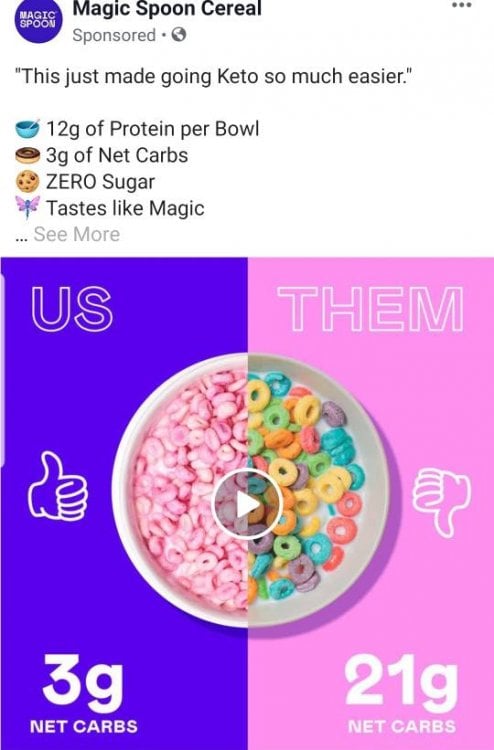
Anyone try Magic Spoon Cereal? It keeps coming up in my newsfeed and I wonder if it's worth it. [emoji18] Screenshot_20190818-095741_Facebook.jpeg
Sent from my SM-G965U using BariatricPal mobile app

  • Replies 4
  • Views 5k
  • Created
  • Last Reply

Top Posters In This Topic

Most Popular Posts

Posted Images

Featured Replies

What's it made with? Ingredients and nutrition panel please? :D

Never heard of it before.

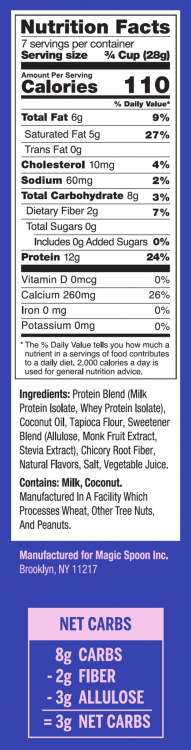
Just checked the website for ya'll. This is the fruity flavor's nutrition facts. I was told not to introduce fiber into my diet until I'm at my goal weight as it will plateau me, so I personally wouldn't consider a cereal like this until then. Especially since Chicory root fiber is a fast digesting fiber, when the goal for adding fiber to a diet is that it will digest slower to keep you fuller/satisfied for longer to curb cravings.
image.thumb.png.9dfb0877d40e3aed60a712686261dca5.png

3 minutes ago, PeachPerfect said:

Just checked the website for ya'll. This is the fruity flavor's nutrition facts. I was told not to introduce Fiber into my diet until I'm at my goal weight as it will plateau me, so I personally wouldn't consider a Cereal like this until then. Especially since Chicory root fiber is a fast digesting fiber, when the goal for adding fiber to a diet is that it will digest slower to keep you fuller/satisfied for longer to curb cravings.
image.thumb.png.9dfb0877d40e3aed60a712686261dca5.png

I ordered some last week. I will let you know how it taste!

Join the conversation

You can post now and register later. If you have an account, sign in now to post with your account.

Guest
Reply to this topic...

Trending Products

PatchAid Vitamin Patches

Account

Navigation

Search

Search

Configure browser push notifications

Chrome (Android)
  1. Tap the lock icon next to the address bar.
  2. Tap Permissions → Notifications.
  3. Adjust your preference.
Chrome (Desktop)
  1. Click the padlock icon in the address bar.
  2. Select Site settings.
  3. Find Notifications and adjust your preference.