Skip to content
View in the app

A better way to browse. Learn more.

BariatricPal

A full-screen app on your home screen with push notifications, badges and more.

To install this app on iOS and iPadOS
  1. Tap the Share icon in Safari
  2. Scroll the menu and tap Add to Home Screen.
  3. Tap Add in the top-right corner.
To install this app on Android
  1. Tap the 3-dot menu (⋮) in the top-right corner of the browser.
  2. Tap Add to Home screen or Install app.
  3. Confirm by tapping Install.

Breakfast for the next months

  • Replies 3
  • Views 499
  • Created
  • Last Reply

Top Posters In This Topic

Most Popular Posts

  • Good for you! I still drink a chocolate protein shake every morning for breakfast. Been doing it for years pre-op, so it's just natural for me.

  • BTW, everyone has their own preferences, but I've tried a lot of the protein powders. Body Fortress has the cheapest (on Amazon) and best tasting in my opinion. ISOpure is good, but twice the price

Posted Images
Featured Replies

Good for you! I still drink a chocolate protein shake every morning for breakfast. Been doing it for years pre-op, so it's just natural for me.

8 hours ago, big_ange said:

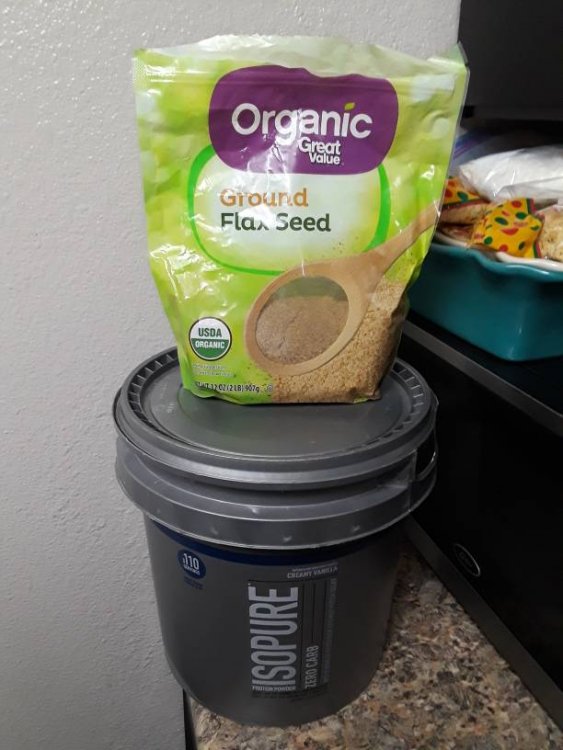
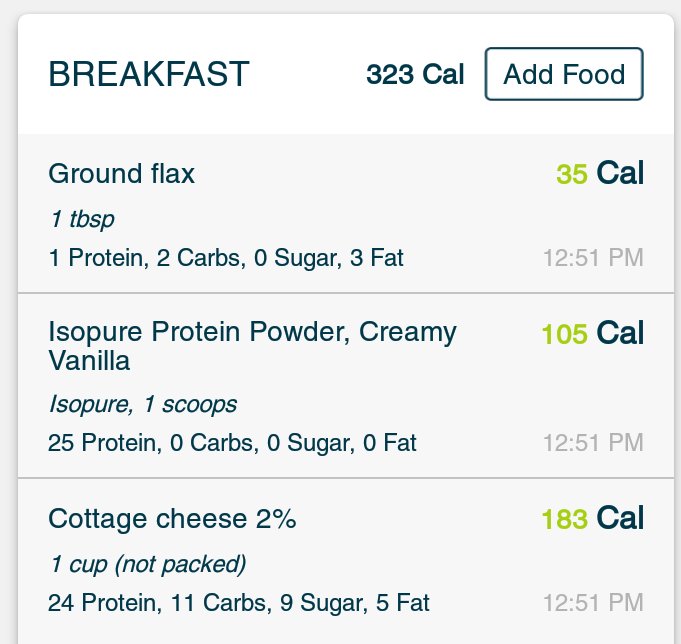
So I've been trying to cut back my normal Breakfast and get use to not eating a normal meal.. I'm pretty good at skipping breakfast but I know with the operation you need your Protein intake...

This is what I'm having for the next 3 months20190428_231904.jpeg20190428_221347.jpeg
Sent from my SAMSUNG-SM-J727AZ using BariatricPal mobile app

Nice ?

You can also try blending ice into the protein shake to bulk up the volume but not the calories

BTW, everyone has their own preferences, but I've tried a lot of the protein powders. Body Fortress has the cheapest (on Amazon) and best tasting in my opinion. ISOpure is good, but twice the price of Body Fortress. Walmart just started carrying the Body fortress as well. Just FYI.

Join the conversation

You can post now and register later. If you have an account, sign in now to post with your account.

Guest
Reply to this topic...

Trending Products

PatchAid Vitamin Patches

Account

Navigation

Search

Search

Configure browser push notifications

Chrome (Android)
  1. Tap the lock icon next to the address bar.
  2. Tap Permissions → Notifications.
  3. Adjust your preference.
Chrome (Desktop)
  1. Click the padlock icon in the address bar.
  2. Select Site settings.
  3. Find Notifications and adjust your preference.