Skip to content
View in the app

A better way to browse. Learn more.

BariatricPal

A full-screen app on your home screen with push notifications, badges and more.

To install this app on iOS and iPadOS
  1. Tap the Share icon in Safari
  2. Scroll the menu and tap Add to Home Screen.
  3. Tap Add in the top-right corner.
To install this app on Android
  1. Tap the 3-dot menu (⋮) in the top-right corner of the browser.
  2. Tap Add to Home screen or Install app.
  3. Confirm by tapping Install.

Infected incisions?

  • Replies 5
  • Views 3.2k
  • Created
  • Last Reply

Featured Replies

Hmmmmm. It’s hard to tell, but under the steri strip on the top, is that drainage of a yellowish nature? It does look a bit inflamed but that may not be unusual as everyone’s skin reacts differently to surgical incisions. If there is any purulent drainage though then a trip to your surgeons office is certainly warranted as you may need antibiotics if there is an infection.

I had one incision that always looked a bit worse than the others.

I am four days gastric sleeve post op and concerned about one of my incisions being infected. Does it look infected to anyone else? IMG_1639.thumb.JPG.4aa8eae05d4db676e614c4d9c3baddb1.JPGIMG_1639.thumb.JPG.4aa8eae05d4db676e614c4d9c3baddb1.JPG
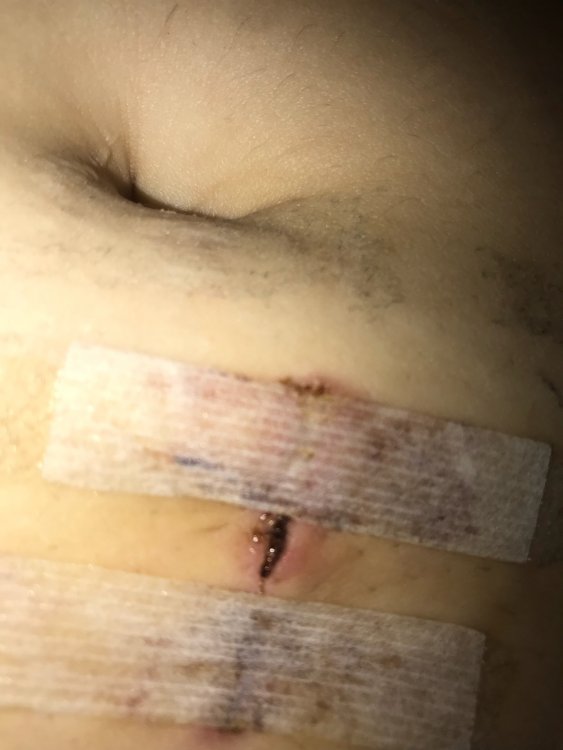


Yes looks infected to me - Call your doctor before it turns into something ugly

Sent from my SM-G955U using BariatricPal mobile app

It does look irritated and likely infected. The redness, draining, and separation of the incision are concerning. I'm not a doctor but none of those things were present with my incisions so I recommend seeing your doctor ASAP to resolve it quickly if necessary.

I did experience a rash on my chest post-op that I felt embarrassed about mentioning to my doctor. They had to prescribe a medicated powder but it helped a lot to know that it wasn't a big concern to them.

Archived

This topic is now archived and is closed to further replies.

Trending Products

PatchAid Vitamin Patches

Account

Navigation

Search

Search

Configure browser push notifications

Chrome (Android)
  1. Tap the lock icon next to the address bar.
  2. Tap Permissions → Notifications.
  3. Adjust your preference.
Chrome (Desktop)
  1. Click the padlock icon in the address bar.
  2. Select Site settings.
  3. Find Notifications and adjust your preference.