Skip to content
View in the app

A better way to browse. Learn more.

BariatricPal

A full-screen app on your home screen with push notifications, badges and more.

To install this app on iOS and iPadOS
  1. Tap the Share icon in Safari
  2. Scroll the menu and tap Add to Home Screen.
  3. Tap Add in the top-right corner.
To install this app on Android
  1. Tap the 3-dot menu (⋮) in the top-right corner of the browser.
  2. Tap Add to Home screen or Install app.
  3. Confirm by tapping Install.

3 month post op!

  • Replies 37
  • Views 3.9k
  • Created
  • Last Reply

Featured Replies

What a difference, congratulations on your weight loss xx

Keep up the good work!

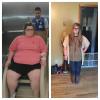
Wow! My favorite part about this is how happy you look in the 2nd pic !

happy Llama sad Llama... big fat mama Llama.

Hey guys! Just wanted to share an update. I'm a few days past my 3 month mark and I'm down 63 pounds! This journey has been a struggle but so worth it. Good luck to everyone! (First pic was leaving the hospital after surgery)

attachicon.gif ImageUploadedByBariatricPal1476160387.514537.jpg

Sent from my iPhone using the BariatricPal App

You look amazing!!!!!

What are you eating now? How many times are you eating?

Sent from my SM-G928T using the BariatricPal App

Wow! Awesome progress. You must be feeling better. I know I am and haven't lost as much as you. Wishing you continued success.

  • Author
  • Popular Post

Thank you so much, everyone! I do three small meals a day with one Fiber one snack (on occasion) . I don't eat any bread or fried foods. I only drink Water, skim milk and decaf coffee. I try to watch my fat grams in everything I eat. I was a huge soda drinker before and I haven't had a soda (or caffeine) in 4 months. I definitely think that helped jump start my weight loss. I eat lots of turkey, grilled chicken and fish, veggies, cheese, Beans etc.

I feel like a new person and I am regaining happiness that I lost years ago.

Sent from my iPhone using the BariatricPal App

Archived

This topic is now archived and is closed to further replies.

Trending Products

PatchAid Vitamin Patches

Account

Navigation

Search

Search

Configure browser push notifications

Chrome (Android)
  1. Tap the lock icon next to the address bar.
  2. Tap Permissions → Notifications.
  3. Adjust your preference.
Chrome (Desktop)
  1. Click the padlock icon in the address bar.
  2. Select Site settings.
  3. Find Notifications and adjust your preference.