Skip to content
View in the app

A better way to browse. Learn more.

BariatricPal

A full-screen app on your home screen with push notifications, badges and more.

To install this app on iOS and iPadOS
  1. Tap the Share icon in Safari
  2. Scroll the menu and tap Add to Home Screen.
  3. Tap Add in the top-right corner.
To install this app on Android
  1. Tap the 3-dot menu (⋮) in the top-right corner of the browser.
  2. Tap Add to Home screen or Install app.
  3. Confirm by tapping Install.

100 Pounds Down Today!

  • Popular Post

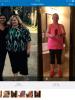
Finally, I hit a big goal and have lost 100 pounds. It feels so good, but I can't decide what kind of reward I should give myself. I'm sure I will come up with something. Now to go after those last 45 pesky pounds.

Next goal is 11 more pounds and I'm officially not obese. I think that will be even bigger accomplishment.

post-267913-14622205184268_thumb.jpg

Edited by kaitlynm

  • Replies 13
  • Views 1.6k
  • Created
  • Last Reply

Featured Replies

Look at you! That must feel awesome. I am waiting......gotta one more month.

WOOHOO!!!! Happy Dance for you! I remember well that feeling of accomplishment ... savor every moment of it, you earned it!

My planned reward for the "no longer obese" milestone is a pair of Frye boots. And you do look fantastic!!

Sent from my iPhone using the BariatricPal App
What a fantastic achievement! Congratulations on all yoru hard work - and the payoff!

That is such a great event! Congrats! My treat was to buy some smaller cloths! I enjoyed being able to buy from the regular size section! Good luck on your journey!

Yes you must treat yourself to something, very well done hope to join you in the future

100 lbs down!!!

hi Tex

great pics, transformation!!!

wonderful milestone!!!

entering the century club

party dance, party dance

friends at gym presented YOU $300 gift card

btw - if you need help spending that gift card, give me a call ;)

keep up the good work for the rest of your healthier, happier, longer life

kathy

congrats

Archived

This topic is now archived and is closed to further replies.

Trending Products

PatchAid Vitamin Patches

Account

Navigation

Search

Search

Configure browser push notifications

Chrome (Android)
  1. Tap the lock icon next to the address bar.
  2. Tap Permissions → Notifications.
  3. Adjust your preference.
Chrome (Desktop)
  1. Click the padlock icon in the address bar.
  2. Select Site settings.
  3. Find Notifications and adjust your preference.