Skip to content
View in the app

A better way to browse. Learn more.

BariatricPal

A full-screen app on your home screen with push notifications, badges and more.

To install this app on iOS and iPadOS
  1. Tap the Share icon in Safari
  2. Scroll the menu and tap Add to Home Screen.
  3. Tap Add in the top-right corner.
To install this app on Android
  1. Tap the 3-dot menu (⋮) in the top-right corner of the browser.
  2. Tap Add to Home screen or Install app.
  3. Confirm by tapping Install.

Pics!

  • Replies 11
  • Views 816
  • Created
  • Last Reply

Featured Replies

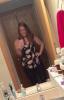
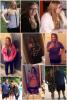
you look amazing!! I am so proud for you. I remember what that felt like. My band failed and I gained most of my weight back before I got my sleeve. Two weeks post op. I can't wait to get this weight off AGAIN. I am looking forward to wearing all my boxed up clothes again.

  • Author

PS- I'm 22, any of you young ones with questions about lifestyle ect with the sleeve at this age... Feel free to inbox me, & let me tell you it's the best decision I ever made!

You look fantastic!

P.S. We have the same phone and case, lol.

Congrats

U look beyond fab!!!! Congrats!!!!

Archived

This topic is now archived and is closed to further replies.

Trending Products

PatchAid Vitamin Patches

Account

Navigation

Search

Search

Configure browser push notifications

Chrome (Android)
  1. Tap the lock icon next to the address bar.
  2. Tap Permissions → Notifications.
  3. Adjust your preference.
Chrome (Desktop)
  1. Click the padlock icon in the address bar.
  2. Select Site settings.
  3. Find Notifications and adjust your preference.