Skip to content
View in the app

A better way to browse. Learn more.

BariatricPal

A full-screen app on your home screen with push notifications, badges and more.

To install this app on iOS and iPadOS
  1. Tap the Share icon in Safari
  2. Scroll the menu and tap Add to Home Screen.
  3. Tap Add in the top-right corner.
To install this app on Android
  1. Tap the 3-dot menu (⋮) in the top-right corner of the browser.
  2. Tap Add to Home screen or Install app.
  3. Confirm by tapping Install.

Pictures

  • Replies 24
  • Views 2k
  • Created
  • Last Reply

Featured Replies

  • Author

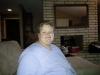
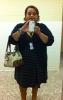
attachicon.gif ImageUploadedByBariatricPal1421670953.494100.jpgattachicon.gif ImageUploadedByBariatricPal1421670970.853932.jpg

1st picture is 2013 about a year before I started to seriously pursue WLS. I was 265.

2nd photo is 2 weeks ago. 195lbs.

You look GREAT!!! C'mon newbies, it's ALL worth it! I know it's hard to see the big picture! The frustration after surgery, the pain, the stalls, the hair loss all of it...and I'm only 9 mths post op! You CAN get thru it and conquer. I'd do it all again, no doubt. V

You both look fantastic! Fuzzymonkey, you have taken years off your face. Congratulations to you both, you should be proud.

Great job!!! Keep up the amazing work!

Wowza! Look fantastic!!

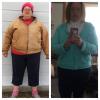
post-197940-0-26037000-1422080279_thumb.jpg

Edited by Folly

Thank you everyone. WE are proof positive that health contributes to happy!

Great job! Congratulations.

Wonderful!!

Archived

This topic is now archived and is closed to further replies.

Trending Products

PatchAid Vitamin Patches

Account

Navigation

Search

Search

Configure browser push notifications

Chrome (Android)
  1. Tap the lock icon next to the address bar.
  2. Tap Permissions → Notifications.
  3. Adjust your preference.
Chrome (Desktop)
  1. Click the padlock icon in the address bar.
  2. Select Site settings.
  3. Find Notifications and adjust your preference.