Skip to content
View in the app

A better way to browse. Learn more.

BariatricPal

A full-screen app on your home screen with push notifications, badges and more.

To install this app on iOS and iPadOS
  1. Tap the Share icon in Safari
  2. Scroll the menu and tap Add to Home Screen.
  3. Tap Add in the top-right corner.
To install this app on Android
  1. Tap the 3-dot menu (⋮) in the top-right corner of the browser.
  2. Tap Add to Home screen or Install app.
  3. Confirm by tapping Install.

Pictures

  • Replies 24
  • Views 2k
  • Created
  • Last Reply

Featured Replies

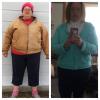
Absolutely awesome! What a difference!! You look like a new person. Can't imagine how folks recognize you ???? you no doubt worked very hard and you must be quite delighted with your new self.

  • Author

Absolutely awesome! What a difference!! You look like a new person. Can't imagine how folks recognize you ???? you no doubt worked very hard and you must be quite delighted with your new self.

It's pretty amazing, thank you!

You look amazing and incredible. Do you feel better and have more energy?

Wow what a difference!

  • Author

You look amazing and incredible. Do you feel better and have more energy?

Oh yes!!! I don't feel like the same person! I couldn't walk a couple blocks a year ago. 2 weeks ago I walked/hiked 34 miles in a week! ME!!!

Fuzzy monkey

Your skin is so beautiful... Do you use a special makeup? Congrats on the weight loss too..you guys look amazing

post-233397-14216709535229_thumb.jpgpost-233397-14216709708305_thumb.jpg

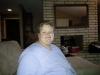
1st picture is 2013 about a year before I started to seriously pursue WLS. I was 265.

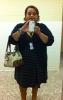
2nd photo is 2 weeks ago. 195lbs.

Everyone's old awesome ????????????????????????????????????????????

Archived

This topic is now archived and is closed to further replies.

Trending Products

PatchAid Vitamin Patches

Account

Navigation

Search

Search

Configure browser push notifications

Chrome (Android)
  1. Tap the lock icon next to the address bar.
  2. Tap Permissions → Notifications.
  3. Adjust your preference.
Chrome (Desktop)
  1. Click the padlock icon in the address bar.
  2. Select Site settings.
  3. Find Notifications and adjust your preference.