




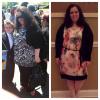
3 month pics
- Replies 38
- Views 3.8k
- Created
- Last Reply




Most Popular Posts
-
You look great. Super cute dress!
-
Congratulations on your best decision ever!!! Well the first 5 days are the hardest! The next 3 weeks weren't so bad and then it gets easier. Hair Loss no one told me about and didn't know it was goin
-
You look fantastic and years younger!! Great job sister.
Posted Images
Featured Replies
Join the conversation
You can post as a guest; create a free account to track replies, follow topics, and be part of the largest weight loss surgery community.
Good Morning ,
Well I just had to share It's been 3 1/2 months since my surgery and I'm down about 60 pds. I have gone from a 22 to 14 and I'm living life now. I feel amazing this is the best thing I have ever done. Only wish I had done it sooner. Just wanted to share . If you thinking of doing it just do it . It will be the best thing you ever do for yourself. The first picture is a year ago and the second was last night.
Maria ????