




Finally Posting A Before & After
- Replies 6
- Views 1.1k
- Created
- Last Reply
Top Posters In This Topic
-
KAATNS 1 post
-
Lady VS 1 post
-
Bandista 1 post
-
PuraVida37 1 post



Popular Days
Most Popular Posts
-
Fantastic!!
-
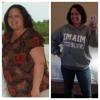
Happy Birthday! And what a great gift to yourself -- health and happiness! You look amazing. Congratulations on all the hard work that brought you to this place. So happy for you!
-
Looking great! Keep it up!!
Posted Images
Featured Replies
Join the conversation
You can post as a guest; create a free account to track replies, follow topics, and be part of the largest weight loss surgery community.
Ok I have been a huge fan of before & after photos but with this new layout I'm finding it impossible to know which success stories/pics are from lapband patients vs. other wls? Of course it doesn't matter now that I have already chosen a wls that works for me but when I was starting out the pics were such motivation...
On to Great Things...today 11/15 is my 32nd Birthday and I was banded on 03/04/13 best decesion EVER!! I have lost over 60lbs and I am almost at Goal!!