Skip to content
View in the app

A better way to browse. Learn more.

BariatricPal

A full-screen app on your home screen with push notifications, badges and more.

To install this app on iOS and iPadOS
  1. Tap the Share icon in Safari
  2. Scroll the menu and tap Add to Home Screen.
  3. Tap Add in the top-right corner.
To install this app on Android
  1. Tap the 3-dot menu (⋮) in the top-right corner of the browser.
  2. Tap Add to Home screen or Install app.
  3. Confirm by tapping Install.

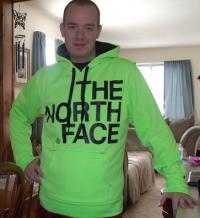
Finally going to post a picture...

Here goes nothing... I've never been much for pictures but.. ^_^

One from last year at my dads wedding..

And the newest from my vacation last week..

I love comparing pictures. It amazes me more than anything.

Went from a 4XL and now buying XL and Large. B)

post-26246-13813812911446_thumb.jpg

post-26246-13813812911599_thumb.jpg

  • Replies 15
  • Views 1.2k
  • Created
  • Last Reply

Featured Replies

You look great!!!!

  • Author

Thank you guys! :)

WOW!!!!

You look amazing. Congratulations on the new you.

Congratulations, you look awesome!!!

U look amazing!!!! Where did you go on vaca? Looks like my neck of the woods.

You look fantastic!!

Hubba Hubba you look amazing REM!!! congrats on the new you my friend:)

You look great!

  • Author

Thank you guys so much for the kind words!

Makes it all worth it. :)

  • Author

U look amazing!!!! Where did you go on vaca? Looks like my neck of the woods.

I go to New Hampshire every summer.

Love it there. B)

Great job!

Awesome! You look great! Congratulations!

Archived

This topic is now archived and is closed to further replies.

Trending Products

PatchAid Vitamin Patches

Account

Navigation

Search

Search

Configure browser push notifications

Chrome (Android)
  1. Tap the lock icon next to the address bar.
  2. Tap Permissions → Notifications.
  3. Adjust your preference.
Chrome (Desktop)
  1. Click the padlock icon in the address bar.
  2. Select Site settings.
  3. Find Notifications and adjust your preference.