



- Replies 9
- Views 718
- Created
- Last Reply



Posted Images
Featured Replies
Join the conversation
You can post as a guest; create a free account to track replies, follow topics, and be part of the largest weight loss surgery community.

A better way to browse. Learn more.
A full-screen app on your home screen with push notifications, badges and more.
Join BariatricPal free
You can post as a guest; create a free account to track replies, follow topics, and be part of the largest weight loss surgery community.
Find support for your bariatric or GLP-1 journey. Save helpful conversations and take part when you are ready.
Choose your email preferences on the registration form.
Already a member? Sign in
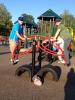
Was so excited to be playing at the park yesterday with my son and my fiancé. We went on the see saw together a s I was so amazed to be the one for once stuck up in the air lol. It took my son standing on my feet on my side to get us to almost be evened out lol! Before the weight loss I was 60lbs heavier then my future husband. Now I'm 30lbs lighter! It feels so great!!!