Skip to content
View in the app

A better way to browse. Learn more.

BariatricPal

A full-screen app on your home screen with push notifications, badges and more.

To install this app on iOS and iPadOS
  1. Tap the Share icon in Safari
  2. Scroll the menu and tap Add to Home Screen.
  3. Tap Add in the top-right corner.
To install this app on Android
  1. Tap the 3-dot menu (⋮) in the top-right corner of the browser.
  2. Tap Add to Home screen or Install app.
  3. Confirm by tapping Install.

Hummus chips

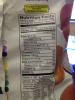
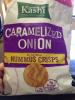
Bought these and thought I'd share - hummus chips

post-51843-13813667169172_thumb.jpg

post-51843-13813667169954_thumb.jpg

They are made by Kashi and come in 3 different flavors. A little high in carbs, but I never eat a full serving size anyways. I eat about 5-10 when I eat them with low cal/low fat chicken salad but I'm sure they'd be great with other things.

  • Replies 7
  • Views 807
  • Created
  • Last Reply

Featured Replies

With cottage cheese!! YUM!

Those look good!!

  • Author

They really are. I'm extremely impressed. They also have a sundried tomato & feta flavor & black pepper and sea salt. I've tried the tomato and feta one - was also good. Onion flavor tastes comparable to Funyuns. Highly recommend and they have protein. 3-4 grams

Are those in with the potato chips at the store or somewhere else? I can't find them.

Are they in Walmart!??

  • Author

I actually found these by the check out isles. I guess I would look by the health/whole wheat grain section - Kashi makes a ton of other things and my Walmart has a little section for things like that - I did by them at Walmart. I wanna say 2.67$/bag. I've been really pleased with every kind I've tried.

I've done different things with them too -

Low cal/low fat chicken salad, tuna salad, crab salad, ham and cheese slices - they are even wonderful plain.

Kashi might sell them on their website. It may be a new product, as I've just started seeing them.

Archived

This topic is now archived and is closed to further replies.

Trending Products

PatchAid Vitamin Patches

Account

Navigation

Search

Search

Configure browser push notifications

Chrome (Android)
  1. Tap the lock icon next to the address bar.
  2. Tap Permissions → Notifications.
  3. Adjust your preference.
Chrome (Desktop)
  1. Click the padlock icon in the address bar.
  2. Select Site settings.
  3. Find Notifications and adjust your preference.