Skip to content
View in the app

A better way to browse. Learn more.

BariatricPal

A full-screen app on your home screen with push notifications, badges and more.

To install this app on iOS and iPadOS
  1. Tap the Share icon in Safari
  2. Scroll the menu and tap Add to Home Screen.
  3. Tap Add in the top-right corner.
To install this app on Android
  1. Tap the 3-dot menu (⋮) in the top-right corner of the browser.
  2. Tap Add to Home screen or Install app.
  3. Confirm by tapping Install.

Still fat!

  • Popular Post

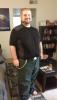
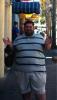
But smaller maybe? I can't tell lol. And I'm not very photogenic. The first is at 388 lbs the other is at 292. And I'm 5 months out.

post-40715-138136636207_thumb.jpg

post-40715-13813663621187_thumb.jpg

  • Replies 50
  • Views 3.7k
  • Created
  • Last Reply

Featured Replies

Wow u have made a terrific transformation. U have lost a whopping 96lbs! Love it!

Dang! work that sleeve!

Great job! Huge difference! Keep it up....what you're doing is working!

  • Author

Thank you all!

OH MY GOODNESS! Fyre! You are definitely rocking that sleeve! fyre...you are definitely on fire and smoking hot!

Congratulations on your weight loss!!!

Good job!! the only thing you need to get rid of now is that Cowboys poster on the wall and you'll be perfect.

????You look great!!! May you continue your fantastic success!!!

Are you kidding? You can't tell? You look fantastic! Trust me!

  • Author

Thank you! All sports related insignia are my partners! Trust me when I say I wish I could touch that poster lol

You look great. Keep up the work

Sent from my iPhone using VST

You look cute!

You look really good! Thanks for sharing!

Wow, looking good! I can sure tell you've lost 96 pounds!

Wow....what a difference! you great!

Look at you! Look at your waist--it's definitely shrunk a lot. Your face looks great. You were cute before and you are still cute. You're only 5 months out--imagine how good you're going to feel in a year. Keep up the great work and keep doing what you're doing.

Archived

This topic is now archived and is closed to further replies.

Trending Products

PatchAid Vitamin Patches

Account

Navigation

Search

Search

Configure browser push notifications

Chrome (Android)
  1. Tap the lock icon next to the address bar.
  2. Tap Permissions → Notifications.
  3. Adjust your preference.
Chrome (Desktop)
  1. Click the padlock icon in the address bar.
  2. Select Site settings.
  3. Find Notifications and adjust your preference.