Skip to content
View in the app

A better way to browse. Learn more.

BariatricPal

A full-screen app on your home screen with push notifications, badges and more.

To install this app on iOS and iPadOS
  1. Tap the Share icon in Safari
  2. Scroll the menu and tap Add to Home Screen.
  3. Tap Add in the top-right corner.
To install this app on Android
  1. Tap the 3-dot menu (⋮) in the top-right corner of the browser.
  2. Tap Add to Home screen or Install app.
  3. Confirm by tapping Install.

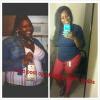
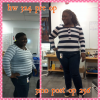
almost 4 months post op progress pic :)

  • Popular Post

i just wanted to share my progress so far :) i used this before pic but it shows me at my HW. march 6th will be 4 months post op. i couldnt be happier!!!

post-36643-1381366345929_thumb.png

  • Replies 10
  • Views 1.3k
  • Created
  • Last Reply

Featured Replies

Hawt mama! You look fab- congrats!

What a difference is right! You look awesome!

  • Author
You look awesome! So much of a difference!

About the only thing that is the same' date=' is your pretty smile :)[/quote']

Thank u so much!! 91 more to go woohoo

Sent from my Samsung G2 using VST

Wow--you look great. That is so encouraging to see as I have surgery in two days!! Very excited and seeing your progress adds to the excitement. Keep up the great work. Hopefully I will have those kind of pictures to add to my profile! :)

Congratulations on your success, you look amazing!

You go girl!! Congrats you look great, keep up the good work.

i just wanted to share my progress so far :) i used this before pic but it shows me at my HW. march 6th will be 4 months post op. i couldnt be happier!!!

:)

Sent from my DROID RAZR HD using VST

Wow! You look amazing! Great work!

Archived

This topic is now archived and is closed to further replies.

Trending Products

PatchAid Vitamin Patches

Account

Navigation

Search

Search

Configure browser push notifications

Chrome (Android)
  1. Tap the lock icon next to the address bar.
  2. Tap Permissions → Notifications.
  3. Adjust your preference.
Chrome (Desktop)
  1. Click the padlock icon in the address bar.
  2. Select Site settings.
  3. Find Notifications and adjust your preference.