Skip to content
View in the app

A better way to browse. Learn more.

BariatricPal

A full-screen app on your home screen with push notifications, badges and more.

To install this app on iOS and iPadOS
  1. Tap the Share icon in Safari
  2. Scroll the menu and tap Add to Home Screen.
  3. Tap Add in the top-right corner.
To install this app on Android
  1. Tap the 3-dot menu (⋮) in the top-right corner of the browser.
  2. Tap Add to Home screen or Install app.
  3. Confirm by tapping Install.
  • Appearance

Join BariatricPal free

  • Ask your own questions
  • Reply and follow topics
  • Message other members
  • No cost, no spam

Fun visual ways to track weight loss

Hi all! I am a person who likes to visually reward myself. I am looking for something visual to keep track of each lb lost. I saw "motivation marbles" on line and my old weight watchers leader used to give us a paper clip to string together for every lb we lost. I was wonder if any of your have any fun ideas that you do!

  • Replies 21
  • Views 8.2k
  • Created
  • Last Reply

Top Posters In This Topic

Most Popular Posts

  • InMyNext30Years!
    InMyNext30Years!

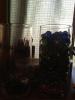
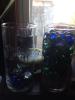
    Hi I found this idea online the jar on the left says pounds lost and the jar on the right says pounds to go... Obviously I have a long way to go! Lol I I color coordinated the marbles green for the mo

  • I like it. Each bead is a story and helps Mr to see how far I have came. I also get a nice braclet out of it.

  • I love the marbles/rocks ideas! I did something quick and not fancy but it helps to inspire me. Day of surgery I took string and measured around my stomach. I check out how much smaller I am with my '

Posted Images
Featured Replies

I have a bracket that I add a bead to for every 10 pounds lost.

I love that ideal ...will try it :)

I like it. Each bead is a story and helps Mr to see how far I have came. I also get a nice braclet out of it.

  • Author

Thanks great idea!

That's such a great idea! Thanks :D

Definitely going to do this!

  • 2 weeks later...

Love that I found this! Great ideas, may a braclet and then something at home, in bathroom or bedroom...thinking art or something...

I like charts and graphs, lol. I created some in excel, and love to look at the trend line. I also track on fitbit, which I can see on phone at any time :)

  • Author

Hi I found this idea online the jar on the left says pounds lost and the jar on the right says pounds to go... Obviously I have a long way to go! Lol I I color coordinated the marbles green for the morbid obesity bmi, blue for obesity, purple for overweight and pink hearts for my healthy weight range. I like it good visual! It's pretty too!

post-48705-13813662809751_thumb.jpg

post-48705-13813662810506_thumb.jpg

Hi I found this idea online the jar on the left says pounds lost and the jar on the right says pounds to go... Obviously I have a long way to go! Lol I I color coordinated the marbles green for the morbid obesity bmi' date=' blue for obesity, purple for overweight and pink hearts for my healthy weight range. I like it good visual! It's pretty too!

[/quote']

Absolutely love that idea and love how you coordinated the BMI colors... Super cute idea!

  • Author

No real science behind it... When i started i weighted 265. the bmi chart says for my height 265-214 is extreme obesity so I put 51 green marbles in the jar, obese is 213-164 so I put 59 blue marbles in for that, overweight is 163-136 so I put 29 purple ones for that and healthy is 135-104 so I put the 31 pink hearts in for that. Just out your 3 favorite color marbles river rocks or gems whatever you can find and count them out according to your bmi chart.

Picked my 3 favorite colors blue green purple.... Green being my least favorite therefor my least favorite weight morbid, (lol) blue being my next obese, purple being my most fav so overweight. I got all the supplies at dollar tree and because its valentines day I found pink hearts and thought that having them at the bottom for the healthy weight was cute... Also I put one big rock in for every 10 lbs just as an added incentive for every 10 lbs. i found the stick on letters from Michael's craft store in the scrap booking section. You can be as little it as much creative as you want.... if you want you can just put multi colored marbles one for each pound you need to loose that was the original one that I found online. I was bored so I made it more creative lol

I love the marbles/rocks ideas! I did something quick and not fancy but it helps to inspire me. Day of surgery I took string and measured around my stomach. I check out how much smaller I am with my 'belly string' every month. I plan on making a beaded necklace the same length when I'm near goal (it's long so it's going to take a lot of beads-expensive!) I'll probably wear it wrapped around my neck twice. Then I'll slip it around my waist to show anyone who asks how big I was-"out to here!" :) excited!!

  • Author

Wow love the string idea too! Lol thanks! Mine will be very expensive as well!

I've heard about the marbles thing it sounds cook. I've got about 50 more pounds to go and these pounds are gonna be a little harder to come off, so maybe this will keep me motivated.

These are great ideas! I hadnt even thought about a visual motivator but geesh, its an awesome idea! I cant wait to get to the dollar tree! Ive always wanted one of those really long silver necklaces and when I this goal weight im gonna get one as long as every inch ive lost off! Ill be able to wear my accomplishment proud without the weight! Loved this thread!

Join the conversation

You can post as a guest; create a free account to track replies, follow topics, and be part of the largest weight loss surgery community.

Join the conversation

You can post now and register later. If you have an account, sign in now to post with your account.

Guest
Reply to this topic...

Account

Navigation

Search

Search

Configure browser push notifications

Chrome (Android)
  1. Tap the lock icon next to the address bar.
  2. Tap Permissions → Notifications.
  3. Adjust your preference.
Chrome (Desktop)
  1. Click the padlock icon in the address bar.
  2. Select Site settings.
  3. Find Notifications and adjust your preference.