Skip to content
View in the app

A better way to browse. Learn more.

BariatricPal

A full-screen app on your home screen with push notifications, badges and more.

To install this app on iOS and iPadOS
  1. Tap the Share icon in Safari
  2. Scroll the menu and tap Add to Home Screen.
  3. Tap Add in the top-right corner.
To install this app on Android
  1. Tap the 3-dot menu (⋮) in the top-right corner of the browser.
  2. Tap Add to Home screen or Install app.
  3. Confirm by tapping Install.

63 lbs down!!

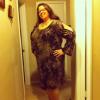
This was Friday night ready for my company appreciation party!

post-206647-13813134600295_thumb.jpg

post-337944-13813140786383_thumb.jpg

  • Replies 7
  • Views 762
  • Created
  • Last Reply

Featured Replies

Beautiful!!

Looking good!

This was Friday night ready for my company appreciation party!

post-337944-13813140786383_thumb.jpg

love the dress........and the necklace also ((that is gorgeous)) just like YOU

U r doing good I haven't bought any new clothes but people r telling me they think I need to cause my clothes r looking baggie & they see me pulling up my pants quite a bit lol

I was banded on the 28th of sept. & have had 2 fills & lost46 lbs so I guess I'm doing ok also but back to u , u do look good and keep up ur journey ur on ur way instead of jflo pretty soon u'll think of urself as j lo lol.

  • Author

Aww thanks everyone! Wishing u all the best!

Going to yell out 63 times well done!!!! Looking great!!

Archived

This topic is now archived and is closed to further replies.

Trending Products

PatchAid Vitamin Patches

Account

Navigation

Search

Search

Configure browser push notifications

Chrome (Android)
  1. Tap the lock icon next to the address bar.
  2. Tap Permissions → Notifications.
  3. Adjust your preference.
Chrome (Desktop)
  1. Click the padlock icon in the address bar.
  2. Select Site settings.
  3. Find Notifications and adjust your preference.