Skip to content
View in the app

A better way to browse. Learn more.

BariatricPal

A full-screen app on your home screen with push notifications, badges and more.

To install this app on iOS and iPadOS
  1. Tap the Share icon in Safari
  2. Scroll the menu and tap Add to Home Screen.
  3. Tap Add in the top-right corner.
To install this app on Android
  1. Tap the 3-dot menu (⋮) in the top-right corner of the browser.
  2. Tap Add to Home screen or Install app.
  3. Confirm by tapping Install.

Added a new pic...whaddya think?

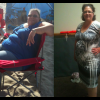
I just added a photo taken a couple of weeks ago. What do you all think? Can 68lbs really make that much of a difference when you're only 'half way' there?

The first photo - which is the one of me on the ferry (yellow railings), was taken when I was up around 314lbs. Then Easter, just about 2 weeks post op. Then in the summer, and so on, to October photo taken in Cuba.

I'm pretty happy and thrilled to go 'shopping' in my own stored clothing bins!! "Normal" clothing is here, and getting better all the time. Down from a 4XL and 24W, to a 16W/16 and XL for the most part - yayyy me!!:wink2:

  • Replies 6
  • Views 1.1k
  • Created
  • Last Reply

Top Posters In This Topic

Featured Replies

I would love to see your pictures...where did you post them?

I agree, would love to see photos of you. We can't find them. However, I must say, you look great in your profile picture. Karen(kll724)

  • Author

They're in the Photo Albums, under the photos tab at the top!

LAP-BAND

See if the link works!

They're in the Photo Albums, under the photos tab at the top!

LAP-BAND®

See if the link works!

Checked them out, you look fabulous!

You look really good, keep up the great work!

You look nice! Congrats! :thumbup:

Join the conversation

You can post now and register later. If you have an account, sign in now to post with your account.

Guest
Reply to this topic...

Trending Products

PatchAid Vitamin Patches

Account

Navigation

Search

Search

Configure browser push notifications

Chrome (Android)
  1. Tap the lock icon next to the address bar.
  2. Tap Permissions → Notifications.
  3. Adjust your preference.
Chrome (Desktop)
  1. Click the padlock icon in the address bar.
  2. Select Site settings.
  3. Find Notifications and adjust your preference.