




Start here
Where are you in your journey?
Choose the path that fits today. We’ll take you to the most useful discussions.
- GLP-1 medication Zepbound, Wegovy, access, side effects, progress, and support.
- Before surgery Compare procedures, plan ahead, and get honest pre-op answers.
- Post-op Recovery, food stages, symptoms, and support.
- Long-term Regain, labs, habits, and life after the honeymoon.
- Revision Explore revision options, complications, and next steps.

haleyjane
LAP-BAND Patients
-
Joined
-
Last visited
-
My surgery date is Monday, December 22, 2008. Starting weight is 220 and my goal weight is 130.
-
 037
037
-
 the picture on the left was taken june 2008 and the picture on the right was taken october 2009. i truely am soo happy & thankful!
-
 005
005
-
 003
003
-
 008
008
-
 011
011
-
 170lbs
-
 July 24, 2009 170lbs
-
 July 24, 2009 170lbs
-
 170lbs
-
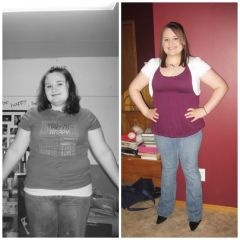 January 2009--approx 200 pounds & June 2009 approx 175 pounds :) I truly love my band! :)
-
 175 pounds, June 26, 2009. my face is shrinkinggg! :)
-
 Is this even me? 175 pounds, June 26, 2009.
-
 No caption
-
 No caption
-
 May 2009
-
 No caption
-
 No caption
-
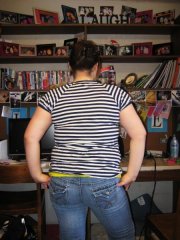 backview 4/28/09 180 pounds!
-
 4/28/09 180 pounds!
-
-
I was hanging out with my boyfriend and two of his friends, one of the friends knew I had the lap band. I was talking about how I was going in for a fill in a couple days and the friend who didn't know I had the lap band told me that having the lap band or gastric bypass is the "lazy" and "easy" way out. This shocked me because he was the first one to tell me that; i wasn't quite sure what to say. It angered me and I told him that this was no way the "easy" way out and he wouldn't know. He continued to tell me his beliefs, telling me he was right and I was wrong; he wouldn't take in consideration anything I was saying. Have any of you experienced people saying this to you? And, if, what do/did you say back to them? :mad2:
-
Congrats to you all! How exciting!!!! It is an amazing feeling. I cannot wait til I can shop in the regular size departments!
-
Don't you love the feeling of baggy jeans!?! Today was the first time I realized how baggy my jeans are getting. It makes me feel so good, I cannot wait til I can go shopping for new clothes! :w00t:
-
Can I join?:thumbup: Surgery Date: 12/22/2008 Highest Weight: 220 Surgery Weight: 218 Current Weight: 201 January Goal: -15lbs Goal: 130
-
Hey all you other December Bandsters! I'm Haley, I was banded on Monday, December 22, 2008!