Ken S.
Administrators
-
Joined
-
Last visited
Bariatric journey
Multiple procedures
Since 2012
Considering options
Everything posted by Ken S.
-
Hello, This certainly sounds like a problem with your browser OR your computer. Can you please let me know what operating system, browser and browser version you're using?? Thanks, Ken
-
Hello, We're working out some kinks on the tickers currently, I apologize for the confusion. I do have a question though...were you able to add your ticker (the Surgery Countdown) to your signature 3 times TODAY? Thanks, Ken
-
Hi there, It appears to be working fine, as far as I can tell. Have you updated your browser or changed any settings that you know of? What time period do you have set for view new content? Thanks, Ken
-
Can you do me a favor: 1) Misspell a word, such as donkay 2) Highlight the word, and right click on it. 3) Hover over "Languages" in the menu that appears 4) Select "English / United States" Please let me know the results.
-
Hi Oregondaisy, In my testing, the spell check works fine - so in order to try and resolve this for you, I'll need some additional information. You're using Firefox, but do you happen to know what version? Also, are you using a Mac or a PC? With regards to why we do not have a spellcheck built into the editor here..it's because there really shouldn't be a need, being that modern web browsers have spell checking built-in. It would be added overhead and development to implement a feature that any modern browser already supports. Thanks
-
Hi there, I have resolved this issue! Thank's so much for reporting it :-)
-
Hello, Is anyone still having trouble replying?
-
Hello, is anyone here that reported or experienced the issue of posting and quick replies still experiencing this ??
-
-
We are still working on the reply/post issues. Are you experiencing this issue 100% of the time, or does it work at times and not at others?
-
Hi there, This bug has been resolved. You should now be able to edit and save your notification preferences. If you continue to have any issues with this please let us know. Thanks!
-
What device and what browser are you using?
-
Firefox Quote. :-)
-
Quote testing.
-
Firefox 11 Testing. Firefox 11 Editing.
-
Safari Testing.
-
I've just posted (and edited a post) using Firefox 11...I'm wondering if this is possibly an intermittant issue? What platform are you using (Windows XP, Widnows 7, Mac?)? We'll do our best to reproduce this issue so that we are able to resolve it. Edited. Quick Test.
-
Hi m1aman, I've resolved the issue with your Surgeon not being displayed in the left user post information area. Also, we're working on getting the "Joined" data back into place.
-
Hi Jim, I've just made a test post (using Firefox 10) - and am making this post here using the Quick Reply (in Safari) and both are working for me. Can you let me know what version of Firefox and what version of IE you're having problems with? Thanks, Ken
-
Hello, If it worked previously then it should not be an issue with compatibility mode. Since you don't see the icon, you actually aren't in compatibility mode. If the like button is currently working - I think that it's possible your issue may have been related to too many likes in a 24 hour period. I've drastically increased this value and you should have no issues any longer, assuming that was the cause. Thanks
-
I've made an adjustment - and I believe it may resolve your issues. Can you let me know if you Like is working properly for you?
-
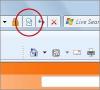
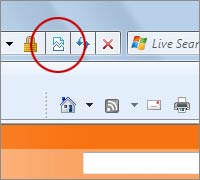
Hello, Can you please make sure that you're not using the site in compatibility mode? There is an icon that looks like a broken page just to the right of the address bar. Try toggling that (clicking the button) and let me know if the like button is still not functioning for you. Thanks, Ken
-
Hello, Some groups are private and must be joined. The ones that are public seem to be working normally for me. Can you please send me a link of one of the groups you're clicking on when you get the error? Thanks, Ken
-
Hello, Where did you find the picture that you're viewing? If you're able to provide us with a URL or Topic Name, that would definitely assist me in troubleshooting. Thanks, Ken
-
Hello, the broken page icon looks like a broken page. Such as the ones represented here The icon looks quite similar throughout all versions of IE. Please let me know if you're able to locate the Compatibility Mode "Broken Page" icon. Thanks, Ken