Skip to content
View in the app

A better way to browse. Learn more.

BariatricPal

A full-screen app on your home screen with push notifications, badges and more.

To install this app on iOS and iPadOS
  1. Tap the Share icon in Safari
  2. Scroll the menu and tap Add to Home Screen.
  3. Tap Add in the top-right corner.
To install this app on Android
  1. Tap the 3-dot menu (⋮) in the top-right corner of the browser.
  2. Tap Add to Home screen or Install app.
  3. Confirm by tapping Install.
  • Appearance

Join BariatricPal free

  • Ask your own questions
  • Reply and follow topics
  • Message other members
  • No cost, no spam

PhillyAj

Pre Op
  • Joined

  • Last visited

  1.    1234567890 reacted to a post in a topic: Over 400Lbs Gastric Sleeve Success Story
  2.    PhillyAj reacted to a post in a topic: Progress with pics
  3.    PhillyAj reacted to a post in a topic: NSV - Warning: Could be oversharing!
  4.    PhillyAj reacted to a post in a topic: Sugar free popsicle addiction
  5.    UpandAtom reacted to a post in a topic: Before and during
  6. Wishing U a healthy & speedy recovered. I was sleeved 12/19/16! Sent from my iPhone
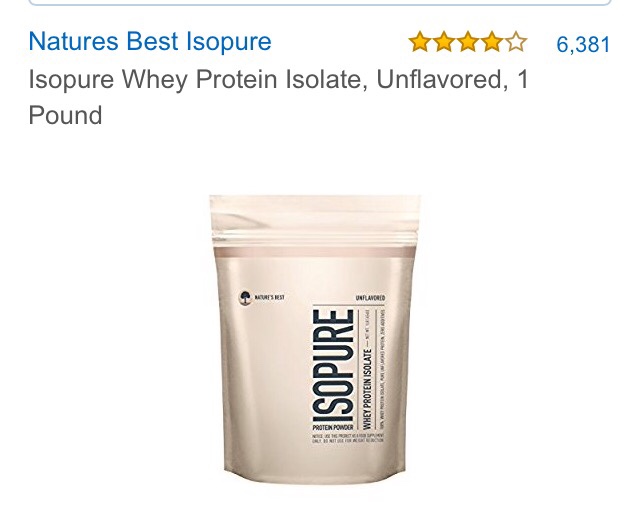
  7. @kathylynn160---are you looking for unflavored isopure powder or the isopure Protein drinks? Sent from my iPhone
  8. Congrats on the wt loss! Hope your knee gets better soon. How did u lose so much wt in 8 months? Im excited to hear. Sent from my iPhone
  9. I got this from Amazon & use it in everything: (i think 1 scoop is 25g): i mix it in my no salt ketchup (for my eggs), unsweetened applesauce, sugar free Jello & pudding etc I also drink 1 Isopure flavor Protein drink a day (which has 40g of protein). I am getting in almost 80g a day of protein. Hope this helps! Sent from my iPhone
  10. sleeved 12/19/16 wt 393# current wt 1/13/17 380#s Sent from my iPhone
  11. @readytobethin---u look amazing! how did u do it? i am 1 month post op rt now. what are ur secrets???? Sent from my iPhone
  12.    rocal6356 reacted to a post in a topic: Hello, friends! 8 months PO!
  13. congrats! Sent from my iPhone
  14. congrats! u look amazing. Sent from my iPhone
  15. u look amazing and happy! congrats! Sent from my iPhone
  16. thats great! congrats! Sent from my iPhone
  17. congrats! u look great! keep up the hard work. Sent from my iPhone
  18.    mamalisa268 reacted to a post in a topic: Happy New Year to all...
  19. Happy New Year to ALL! Sent from my iPhone
  20. congrats! u look great!!! Sent from my iPhone
  21. thats awesome lastipe! u look amazing! Sent from my iPhone
  22.    ResilientMaria reacted to a post in a topic: Philly? South Philly Sleevers?
  23. thanks for that wjessi1---cant wait to try it on Mon. Sent from my iPhone

Account

Navigation

Search

Search

Configure browser push notifications

Chrome (Android)
  1. Tap the lock icon next to the address bar.
  2. Tap Permissions → Notifications.
  3. Adjust your preference.
Chrome (Desktop)
  1. Click the padlock icon in the address bar.
  2. Select Site settings.
  3. Find Notifications and adjust your preference.