JMJames92
Gastric Sleeve Patients
-
Joined
-
Last visited
-
-
-
-
-
-
-
-
-
-
-
-
Like everyone has said so far, the "taking a sip every 5-10 minutes" thing only lasts for a few months. I am 5 years out and I can (if I'm really thirsty) chug a half a bottle of water without getting uncomfortable. Anything more than that though and my stomach will feel overfull and bloated. It took years to be able to do this much but at 6 months out I was drinking pretty much normally.
-
Yes I had the gastric sleeve. Why do you ask?
-
I know I am a little late on this but here goes lol. First off, congratulations on getting your surgery! When I first got mine I thought that the "normal" BMI range was way too low. I think I just thought that because I had never weighed anywhere near the normal range. I currently weigh about 158 which is right at the highest end of normal on the BMI scale. I think the weight I am right now is great. I was ~130 at one point in time which is still in the normal range but that was way too low. I looked gaunt and sickly and my face was sunken in. Basically I guess it probably varies from person to person and whether you are male or female probably plays a role (i.e. if I was female, 130 pounds might not have looked so unhealthy). The normal BMI weight may seem like it is too low now but that may change as you lose weight. I would recommend focusing on your body being healthy rather than what BMI or weight you are. Your doctor can help you determine if your body is in a healthy state at the weight you are. Anyway, congratulations on being two months post-op! The pre-op is a grueling process but it is absolutely worth it. I wish you the best of luck. -Joshua
-
Wow, congratulations! You are so beautiful!
-
-
-
-
It is absolutely normal and you shouldn't let it discourage you. Through your whole weight loss journey you will hit plateaus in which you are not losing any weight for a while. Again, it is completely normal. I would say that if a few months go by and you still haven't started losing any weight again, then you should look into what may be the cause. Good luck and congratulations on the 21 pounds!
-
I wouldn't worry about it at all. The weight comes off the fastest at the beginning and eventually it will slow down and even plateau at some points. When I had my VSG surgery I lost 30 pounds (give or take) in the first two weeks. I had my surgery at the end of August in 2016 and weighed 271 on the day of my surgery and by New Years Day I was down to ~180. Right after this I plateaued for a while. As long as you aren't having any health issues as a result of this rapid weight loss I would recommend just riding this weight loss wave for as long as you can ? Congratulation on your surgery and good luck on you weight loss journey!
-
I would for sure wait longer before trying out restaurants too much. A few months after my surgery I was able to eat like 1 and a quarter chicken mcnuggets from McDonalds. After about a year I was able to eat anything I wanted from any restaurant. The one thing I noticed is that my heart burn was a lot worse with certain foods after my surgery, so I had to make sure to take heartburn medicine before Mexican, Italian, etc. It is actually pretty nice though, even now 4.5 years later, I can order an entrée from a restaurant and make at least 2 or 3 meals out of it (in most cases). The difference in the amount of money I spend at a restaurant now vs before my surgery has to be huge haha.
-
I do not remember exactly how long it was for me because it was 4 and a half years ago and my memory is terrible haha. As far as I can remember though I took two weeks off of work but I would have been completely good to go back to work by the 4th or 5th day after my surgery. As other people have said though, it is different for everyone.
-
I think this rule is important right after surgery. Probably for about a year to a year and a half. You don't want to fill your stomach with water or other liquids and not be able to eat enough food. This is very easy to do. I personally eat food and drink liquid together all the time now (I am over 4 years post op). I would definitely wait at least a year and play it by ear. Some people might not be able to eat and drink at the same time ever again.
-
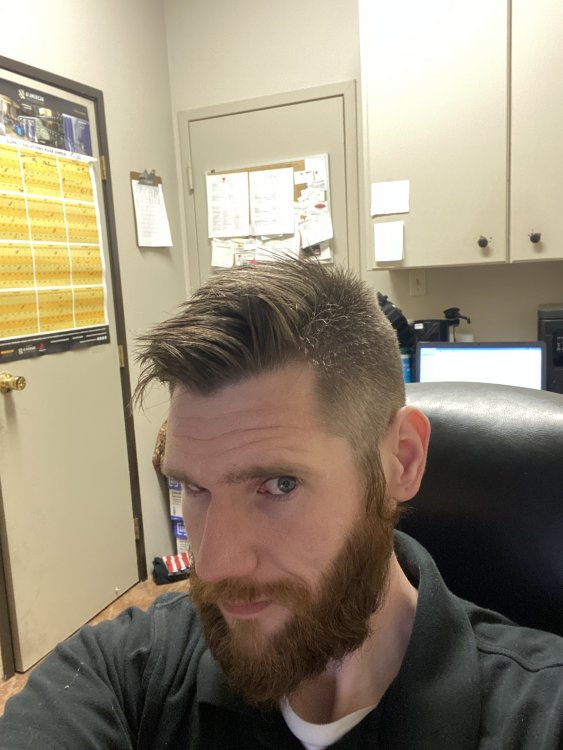
@ms.sss Oh I didn't know we were doing hair now! Haha. Here is my new haircut ?
-
I am sorry that you are having a rough time with your recovery so far. The most important thing you can do is just absolutely 100% follow everything your doctor tells you that you are supposed to do. I know some of it can seem stupid or pointless but they tell you to do it for a reason. The clear liquid diet part is rough to do; I'm sorry you have to go back to that. I think the best thing you can do for your gas/air pains is to be active. I don't mean you need to go out and start playing basketball or training for a marathon. Just make sure you are getting up and walking around often enough. The movement of your body helps to get all that air out of you quicker. Anyway, congratulations on having your surgery! Even though you are a little miserable now, I promise you that it is worth it. Stick with it and welcome to this community!! Good luck! You got this! ?
-
I haven't had weight gain issues but I have been very afraid of that...especially during the COVID-19 pandemic. I think my fear of turning back into "my old obese self" motivated me to keep exercising and watching what I eat (somewhat) throughout this whole thing. I wish you luck in taking that weight back off. You did it once and you can do it again!
-
Congratulations on your surgery and I am glad things are going so well for you! During my liquid stage my favorite thing to eat was this red pepper and tomato soup that you can buy just about anywhere. It is pretty thick so I always watered it down to be on the safe side. I would say it was about 50/50 water and soup. As for pureed recipes...the absolute best thing for this stage (in my opinion) is this vanilla egg custard. It is DELICIOUS! I basically survived on just that during my pureed stage. Well not really but I did eat it quite often in that time period...and even after I left the pureed stage. Also baby food is really easy and good - I recommend the banana! A weird one that I did when I was really craving pizza was taking low carb tortillas, about a quarter or so of one, and some pizza sauce, cheese, and pepperonis and I put them in a magic bullet blender thing (a food processor would probably work better). This created a very weirdly textured pizzaish puree that actually tasted surprisingly good. I imagine some people wouldn't be able to get past the texture/flavor combo on this one though XD. I hope some of my suggestions help you a little bit . I wish you the best of luck in your continued weight loss journey!
-
-
I had a lot of pain immediately after my surgery for reasons that had to do with pain medication issues (it is detailed in a post that I made a while back). As soon as the pain meds started working the pain went down to basically nothing. I wouldn't imagine you're going to feel much pain at all, maybe just some discomfort for a little while. As for dry mouth, I did not experience any that I recall. I recommend just trying to drink or chew on ice when they tell you to. Good luck with everything and I wish you the best!
-
I honestly have no idea why the weight came off so fast. I have always just kind of guessed it was because of my age. I did not lost any hair and I actually wasn't exercising at all for like the first year after my surgery. I was eating VERY little for a long time.