Molly3
Gastric Sleeve Patients
-
Joined
-
Last visited
Everything posted by Molly3
-
The beginning of my 3rd month!
-
When did yours start & stop?
-
Oh please post a pic of your hair baby, Bougienetta, pretty please with a FRITTER on top.
-
Come on people......Please share yours!
-
I'm going to get a damn fritter today!
-
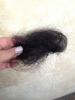
So scary how much comes out!
-
All surgeons are different! I was told to eat & do not be afraid! I eat my protein 1st then veggies then fruit & if there is room, some starch/carbs. I haven't had rice or any kind of dessert. I've had a very thin crispy sliver of pizza & it was DELISH! Fruits at the moment don't sit very well with me.
-
Thanks ladies. I take everything possible but, I knew that it would happen...sigh.
-
That's just what made it to the brush!
-
I unfortunately do not....
-
So I went on vacation with a clean hairbrush...8 days later... Yah, this is real folks! Sent from my iPhone using VST
-
You look great! Sent from my iPhone using VST
-
You look amazing!
-
You look great!
-
You look amazing!
-
Girl, I'm ready to take down my hubs & 5yr old.....they won't stop!
-
So awesome, Fiddle!
-
(((Wasabi)))- I agree with Amanda Rae.......Progress!
-
NICE!
-
Remember it won't taste 1/2 as good as it smells. Sent from my iPhone using VST
-
You look amazing & thank you for sharing!You really do look great in all the pics! WAY TO GO!(((Spatters)))- I can definitely relate to your post, I am so very sorry!You just inspired ME! Thank you so much for sharing.....This was much needed today! You look amazing & you'll be at goal in no time!